
Cube Dissection Examples
Loading the math board and drawing, please wait…
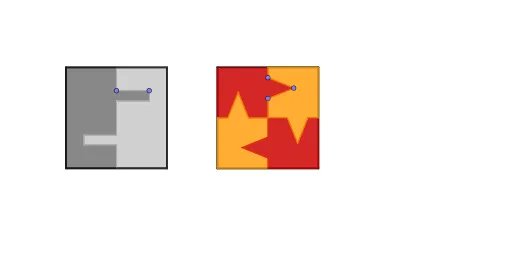
This example demonstrates various ways to dissect a cube and explore its geometric properties. It involves core math concepts like solid geometry, symmetry, centroid, and midpoint calculations. GeoGebra commands used include Intersect, Polygon, Point, Midpoint, Segment, Circle, Line, Mirror, LineBisector, and Rotate. Suitable for high school students and math enthusiasts studying spatial geometry and geometric transformations.
GeoGebra Commands & Parameters
Intersect(xAxis, yAxis) → APolygon(A, B, 4) → poly1, f, g, h, i, C, DPoint(xAxis) → EPolygon(E, F, 4) → poly2, j, k, l, m, G, HMidpoint(h) → IMidpoint(f) → JMidpoint(l) → KMidpoint(j) → LSegment(I, J) → nSegment(K, L) → pPoint(n) → MMidpoint(I, J) → NCircle(M, 0.2) → cIntersect(c, n, 2) → OLine(M, h) → qLine(O, q) → rPoint(q) → PLine(P, n) → sIntersect(r, s) → QMirror(P, N) → P'Mirror(Q, N) → Q'Mirror(O, N) → O'Mirror(M, N) → M'Polygon(D, I, J, A, M, P, Q, O, O', Q', P', M') → poly3, d, m', j_1, a, i_1, m_1, p_1, q_1, o, o', q', p'Polygon(C, I, J, B, M, P, Q, O, O', Q', P', M') → poly4, c_1, m'_1, j_2, b, i_2, m_2, p_2, q_2, o_1, o'_1, q'_1, p'_1Midpoint(m) → RMidpoint(k) → SSegment(R, S) → tPoint(p) → TPoint(p) → ULineBisector(T, U) → ePoint(e) → VIntersect(t, p) → WRotate(T, 90°, W) → T'Rotate(V, 90°, W) → V'Rotate(U, 90°, W) → U'Polygon(K, H, R, T', V', U', W, U, V, T) → poly5, k_1, t_1, h_1, r_1, t', v', u', w, u, vRotate(K, 90°, W) → K'Rotate(H, 90°, W) → H'Rotate(R, 90°, W) → R'Rotate(T', 90°, W) → T''Rotate(V', 90°, W) → V''Rotate(U', 90°, W) → U''Rotate(W, 90°, W) → W'Rotate(U, 90°, W) → U'_1Rotate(V, 90°, W) → V'_1Rotate(T, 90°, W) → T'_1Polygon(K', H', R', T'', V'', U'', W', U'_1, V'_1, T'_1) → poly5', k', t'_1, h', r', t'', v'', u'', w', u'_1, v'_1Rotate(K', 90°, W) → K''Rotate(H', 90°, W) → H''Rotate(R', 90°, W) → R''Rotate(T'', 90°, W) → T'''Rotate(V'', 90°, W) → V'''Rotate(U'', 90°, W) → U'''Rotate(W', 90°, W) → W''Rotate(U'_1, 90°, W) → ZRotate(V'_1, 90°, W) → A_1Rotate(T'_1, 90°, W) → B_1Polygon(K'', H'', R'', T''', V''', U''', W'', Z, A_1, B_1) → poly5'', k'', b_1, h'', r'', t''', v''', u''', w'', z_1, a_1Rotate(K'', 90°, W) → K'''Rotate(H'', 90°, W) → H'''Rotate(R'', 90°, W) → R'''Rotate(T''', 90°, W) → C_1Rotate(V''', 90°, W) → D_1Rotate(U''', 90°, W) → E_1Rotate(W'', 90°, W) → W'''Rotate(Z, 90°, W) → Z'Rotate(A_1, 90°, W) → F_1Rotate(B_1, 90°, W) → G_1Polygon(K''', H''', R''', C_1, D_1, E_1, W''', Z', F_1, G_1) → poly5''', k''', g_1, h''', r''', c_2, d_1, e_1, w''', z', f_1
AI Drawing Prompt Reference
Draw a cube and demonstrate various ways to dissect it, start by sketching three visible faces of the cube, find the centroids and midpoints of each face, connect the centroids of opposite faces to form diagonals, draw circles on the diagonals to locate intersection points, then perform mirror and rotation operations based on these points, finally create multiple symmetrical geometric shapes to show the cube's symmetry and geometric transformation process.
The prompt above was compiled from the original drawing commands and is for reference only.