
Cube Cross Section Demo
Loading the math board and drawing, please wait…
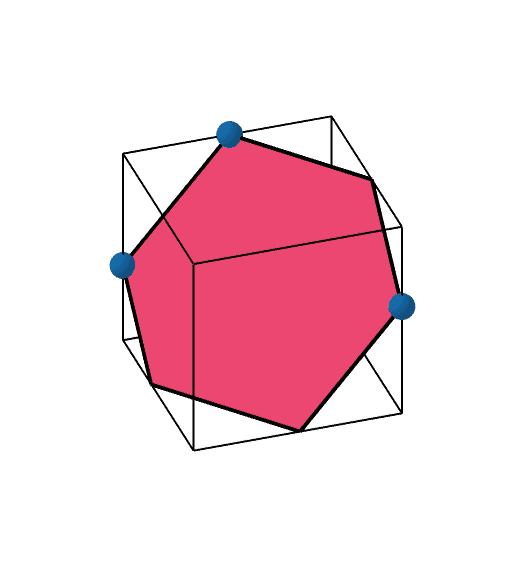
This example demonstrates the formation of various cross-section shapes of a cube by moving three points. It involves core math concepts like solid geometry, cross-section transformation, and spatial visualization. Construction highlights the use of GeoGebra commands: Segment, Point, Plane, Intersect, Prism, IntersectPath. Suitable for high school students and learners needing spatial geometry practice.
GeoGebra Commands & Parameters
Segment(G, H) → GHSegment(F, G) → FGSegment(H, E) → HESegment(E, F) → EFSegment(C, G) → CGSegment(D, H) → DHSegment(C, D) → CDSegment(B, F) → BFSegment(B, C) → BCSegment(A, E) → AESegment(D, A) → DASegment(A, B) → ABPoint(list1) → IPoint(list1) → JPoint(list1) → KPlane(I, J, K) → PIntersect(HE, EF) → LIntersect(EF, BF) → MIntersect(GH, FG) → NPoint(GH) → OIntersect(CD, DA) → TPrism(H, E, F, G, D) → BoundingPrism, Q, edgeEH, edgeEF, edgeFG, edgeGH, edgeDH, edgeEQ, edgeFR, edgeGS, edgeDQ, edgeQR, R, edgeRS, edgeDS, S, faceEFGH, faceDHEQ, faceEFRQ, faceFGSR, faceDHGS, faceDQRSIntersectPath(P, BoundingPrism) → BoundedPolygon_1, U, d, e, f, V, W, Z, A_1, B_1, a, b, c
AI Drawing Prompt Reference
Draw a cube and demonstrate the formation of various cross-section shapes by moving three points. The cube is composed of multiple line segments connecting eight vertices. Inside the cube, three movable points define a plane that intersects the edges of the cube, forming a cross-sectional polygon. The shape of the polygon changes as the positions of the three points vary, ranging from a triangle to a pentagon. Start by drawing the edges and vertices of the cube, then add the three points and the operation to define the plane, and finally show the cross-sectional polygon and its changes as the points move.
The prompt above was compiled from the original drawing commands and is for reference only.