
Crossing the River as a Probability Model: Trig Functions and Elliptic Symmetry
Loading the math board and drawing, please wait…
In collections
중2 확률 탐구
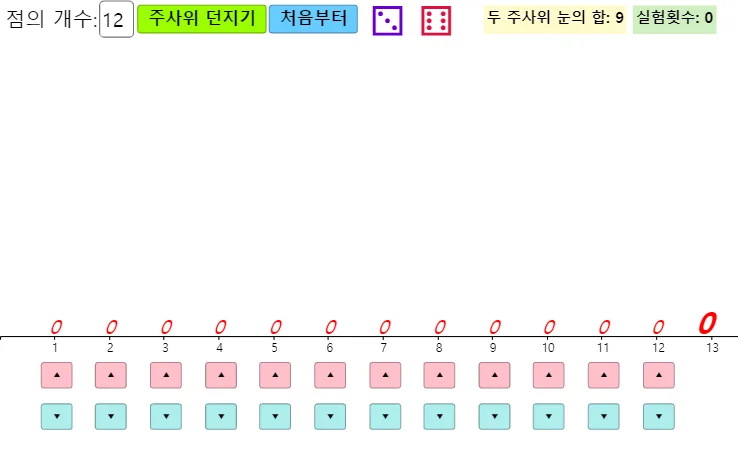
This example models a “crossing the river” (roller derby style) game using random experiments and visualizes how success conditions translate into point distributions and statistical summaries. It focuses on key ideas such as probability & statistics (random sampling, counting successes, estimating outcomes), function-based decision regions (using conditional logic), trigonometric relationships and symmetry (constraints that induce symmetric structure), and ellipse-related geometric boundaries/trajectories. Construction highlights include using Max and If to compute conditional values, Random to generate samples, CountIf to count points meeting the criterion, Sequence together with Element to build and retrieve parameterized data, and Sort to organize results. Textfield and Text are used for interactive parameter input and reporting, while DotPlot creates the scatter/empirical distribution. A variety of GeoGebra objects (including variables and interactive buttons) coordinate the dynamic updates. Suitable for middle/high school and introductory college courses to connect probability simulation with trig/geometric function graphs and symmetry.
GeoGebra Commands & Parameters
Max(B1:B12) → B13Random(1, 6) → d1Random(1, 6) → d2If(Length[l1] > 0, true, false) → e_{a}If(Length[l2] > 0, true, false) → e_{b}CountIf(x ≟ A1, l1) → B1CountIf(x ≟ A2, l1) → B2CountIf(x ≟ A3, l1) → B3CountIf(x ≟ A4, l1) → B4CountIf(x ≟ A5, l1) → B5CountIf(x ≟ A6, l1) → B6CountIf(x ≟ A7, l1) → B7CountIf(x ≟ A8, l1) → B8CountIf(x ≟ A9, l1) → B9CountIf(x ≟ A10, l1) → B10CountIf(x ≟ A11, l1) → B11CountIf(x ≟ A12, l1) → B12CountIf(x ≟ A1, l2) → C1CountIf(x ≟ A2, l2) → C2CountIf(x ≟ A3, l2) → C3CountIf(x ≟ A4, l2) → C4CountIf(x ≟ A5, l2) → C5CountIf(x ≟ A6, l2) → C6CountIf(x ≟ A7, l2) → C7CountIf(x ≟ A8, l2) → C8CountIf(x ≟ A9, l2) → C9CountIf(x ≟ A10, l2) → C10CountIf(x ≟ A11, l2) → C11CountIf(x ≟ A12, l2) → C12Max(C1:C12) → C13Sequence((k - 1 / 4, -3 / 4), k, 1, 12) → l3Element(l4, d1) → 텍스트3Element(l4, d2) → 텍스트4Textfield(K) → 입력상자1DotPlot(l1) → aDotPlot(l2) → bSequence(Text[l5(k), (k - 0.1, 0.1)], k, 1, 12) → l7Sequence(Text[l6(k), (k - 0.1, 0.1)], k, 1, 12) → l8Text(Sum[l5], (12.7, 0.1)) → 텍스트7Text(Sum[l6], (12.7, 0.1)) → 텍스트8Sort(l1) → l9Sort(l2) → l10
AI Drawing Prompt Reference
Create a statistical plot simulating a river-crossing probability experiment: a horizontal axis with 12 equally spaced positions, each showing two dot-plot distributions from two rounds of random rolls, with maximum counts labeled. Include two dot plots for two conditions, sum labels above each position, an interactive input box for parameter adjustment, and sorted data points. Overlay symmetric elliptic boundary trends and trigonometric reference curves to highlight probability distribution and geometric symmetry.
The prompt above was compiled from the original drawing commands and is for reference only.