
Dice Experiments and Probability Histogram Visualization
Loading the math board and drawing, please wait…
In collections
중2 확률 탐구
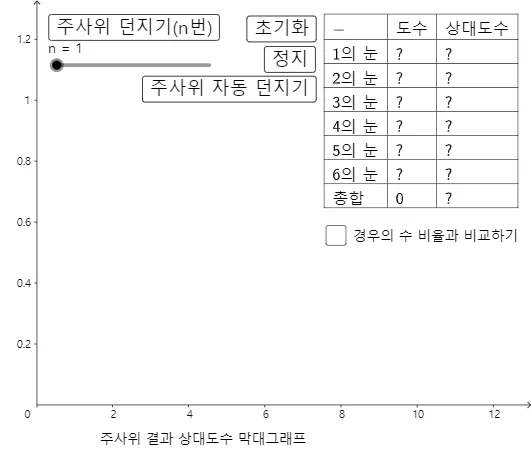
This example uses interactive controls to generate repeated dice outcomes and then visualizes the results as a frequency histogram, clearly demonstrating how an empirical distribution approaches the theoretical probabilities as the number of trials increases. The key mathematical ideas include random experiments, sample outcomes for a die, frequency vs. relative frequency, discrete probability distribution, and counting-based classification of outcomes. Construction highlights in GeoGebra: Random is used to generate the die results; Length and Element manage the result list and extract elements; Frequency and Histogram compute and display the distribution; Last supports accessing the most recent sample; TableText presents counts and categories in a readable table. Named objects such as 주사위결과 (dice outcomes), 주사위결과리스트 (outcome list), and 주사위결과히스토그램 (outcome histogram) connect the raw randomness to the statistical visualization. Suitable for middle/high school probability & statistics lessons, classroom demonstrations, and exploratory learning.
GeoGebra Commands & Parameters
Random(1, 6) → 주사위결과Length(주사위결과리스트) → 주사위결과개수Histogram(계급, 주사위결과리스트, true, 1 / 주사위결과개수) → 주사위결과히스토그램Last(주사위결과리스트) → L_1Frequency(계급, 주사위결과리스트) → L_2Element(L_2, 1) → B2Element(L_2, 2) → B3Element(L_2, 3) → B4Element(L_2, 4) → B5Element(L_2, 5) → B6Element(L_2, 6) → B7TableText({{A1, B1, C1}, {A2, B2, C2}, {A3, B3, C3}, {A4, B4, C4}, {A5, B5, C5}, {A6, B6, C6}, {A7, B7, C7}, {A8, B8, C8}}, "|_lll") → 텍스트1Line(S, xAxis) → f
AI Drawing Prompt Reference
Create a probability histogram for dice experiments, including a list of dice outcomes, the number of outcomes, a frequency histogram, the last experiment result, and a frequency table. First, generate a random number between 1 and 6 as the dice outcome, then calculate the length of the outcome list, and use these outcomes to create a frequency histogram to show the frequency of each outcome. Finally, list the last experiment result and display the frequency table, including the frequency and relative frequency of each outcome.
The prompt above was compiled from the original drawing commands and is for reference only.