
Cross Sections of a Triangular Pyramid
Loading the math board and drawing, please wait…
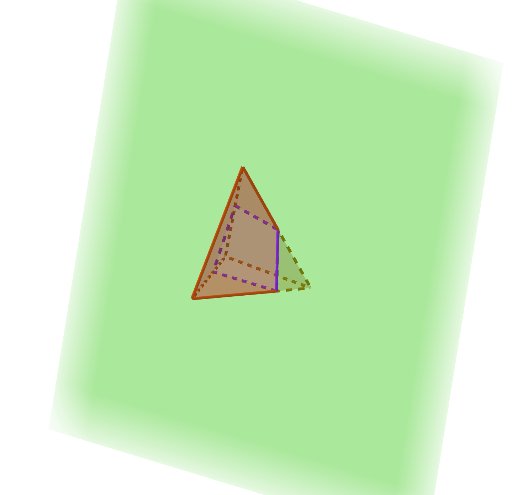
This example demonstrates the cross sections of a triangular pyramid, involving the concept of cross sections in solid geometry. Using GeoGebra commands such as Polygon, Centroid, and Line, it dynamically shows the shapes of the pyramid's cross sections at different positions, including triangles and ellipses. Suitable for high school mathematics education, particularly in solid and coordinate geometry.
GeoGebra Commands & Parameters
Polygon(B, A, 3, xOyPlane) → poly1, f, g, h, DCentroid(poly1) → GLine(G, zAxis) → iPoint(i) → HPyramid(poly1, H) → j, faceABH, faceADH, faceBDH, edgeBH, edgeAH, edgeDHPoint(Circle[A, Distance[B, A], Segment[B, A]]) → CIntersectPath(p, j) → poly2, I, J, K, L, k, l, m, n
AI Drawing Prompt Reference
Draw a 3D diagram of a triangular pyramid (tetrahedron) formed by a triangular base and an apex. First place three points on a horizontal plane to define the triangular base, then mark the centroid of that base triangle. Through the centroid, draw a vertical line and take a point on it as the apex. Connect the apex to the three base vertices to form the pyramid’s faces and edges. Next, choose a circle based on the distance between two base points and use it to determine an additional point that helps define the cutting positions. Finally, create cross-sectional shapes by intersecting the pyramid with cutting positions, showing how the section contours change across different locations (including triangular and curved-looking sections).
The prompt above was compiled from the original drawing commands and is for reference only.