
Cross Sections of a Pyramid
Loading the math board and drawing, please wait…
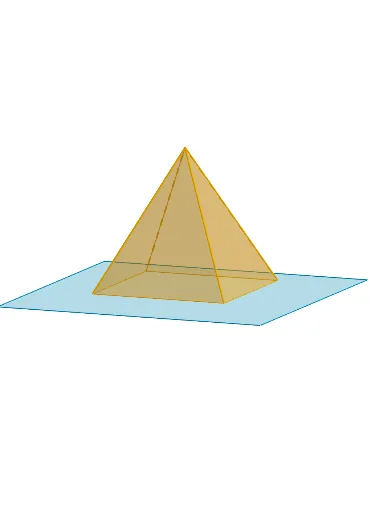
This GeoGebra example dynamically demonstrates the cross-sectional shapes obtained when planes intersect a pyramid at various positions and angles. It explores core concepts in solid geometry, including polyhedra, plane-polyhedron intersections, and the variation of cross-sectional polygons. The construction leverages GeoGebra commands such as Polygon, PointIn, Translate, Rotate, Pyramid, Plane, IntersectPath, and OrthogonalLine, along with key objects like B, poly3, A, h, and others to build interactive cross sections. It is suitable for high school geometry classes, mathematical modeling, and students investigating three-dimensional shape properties.
GeoGebra Commands & Parameters
Polygon(B + (-2, -2), B + (2, -2), B + (2, 2), B + (-2, 2)) → poly3, e, f, g, iPointIn(poly3) → CTranslate((0, 0, 0), Vector[B, C]) → APolygon(A + (-4, -4), A + (4, -4), A + (4, 4), A + (-4, 4)) → poly1, a, b, c, dRotate(Rotate[Translate[poly1, Vector[A, A + (0, 0, h)]], (90° * s), A + (0, 0, h), yAxis], (90° * t), A, zAxis) → poly2Pyramid(Polygon[(2, 2, 0), (2, -2, 0), (-2, -2, 0), (-2, 2, 0)], -4) → m, M, face1, face2, face3, face4, edge1, edge2, edge3, edge4Rotate(D, 120°, (0, 0, 0)) → EPolygon(D, E, 3, xOyPlane) → poly4, j, k, l, FPointIn(poly2) → GPointIn(poly2) → HPointIn(poly2) → IPlane(G, I, H) → nIntersectPath(n, m) → poly6, poly5, r, a_1, b_1, c_1, K, L_1, O, P, J, L, p, qRotate(m, 0, zAxis) → m'Rotate(m, 0, zAxis) → m'_1OrthogonalLine(A, n) → d_1
AI Drawing Prompt Reference
Draw a square-based pyramid and generate cross-sections at different positions and angles to observe the changes in the cross-sectional shapes. First, draw the square base, then create a point moving on the base, use translation and rotation to generate the cross-section polygon, and finally use the intersection of a plane and a path to generate the cross-sectional shapes.
The prompt above was compiled from the original drawing commands and is for reference only.