
Create Your Own Translation
Loading the math board and drawing, please wait…
In collections
Math Coordinate Graphing/ Geometry Project
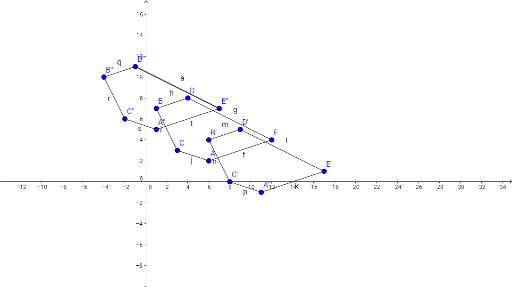
This example demonstrates how to create a translation using GeoGebra. Key mathematical concepts include translation and geometric construction. Using the Segment command, line segments are constructed to achieve point translation. Suitable for middle school and above students to learn geometric transformations.
GeoGebra Commands & Parameters
Segment(A, E) → fSegment(E, D) → gSegment(D, B) → hSegment(B, C) → iSegment(C, A) → jSegment(A', E') → kSegment(E', D') → lSegment(D', B') → mSegment(B', C') → nSegment(C', A') → pSegment(D'', B'') → qSegment(B'', C'') → rSegment(C'', A'') → sSegment(A'', E'') → tSegment(E'', D'') → a
AI Drawing Prompt Reference
Draw two connected line segments to form a pentagon, then connect the endpoints of one segment to another to complete the shape. Duplicate the pentagon and connect corresponding vertices of the original and duplicate pentagons with line segments to illustrate a translation.
The prompt above was compiled from the original drawing commands and is for reference only.