
Arrow Rotation
Loading the math board and drawing, please wait…
In collections
Math Coordinate Graphing/ Geometry Project
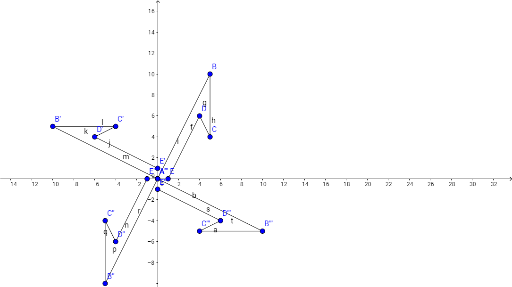
This example demonstrates the rotation of an arrow. The core mathematical concept is rotation. Using GeoGebra commands such as Segment, the rotated arrow can be constructed. Suitable for middle or high school geometry education.
GeoGebra Commands & Parameters
Segment(A, B) → fSegment(B, C) → gSegment(C, D) → hSegment(D, E) → iSegment(A', B') → jSegment(B', C') → kSegment(C', D') → lSegment(D', E') → mSegment(A'', B'') → nSegment(B'', C'') → pSegment(C'', D'') → qSegment(D'', E'') → rSegment(A''', B''') → sSegment(B''', C''') → tSegment(C''', D''') → aSegment(D''', E''') → b
AI Drawing Prompt Reference
Draw an arrow shape made of a five-segment polyline, then show it rotated three times around a common center. Start with the original arrow defined by five connected points. Rotate the entire arrow by a fixed angle to create a second copy, then rotate again for a third, and once more for a fourth. Each copy preserves the same vertex order and shape, appearing at different orientations. The final image shows four arrows radiating from the center, illustrating rotation transformation.
The prompt above was compiled from the original drawing commands and is for reference only.