
Sliding Trapezoids Activity
Loading the math board and drawing, please wait…
In collections
Math Coordinate Graphing/ Geometry Project
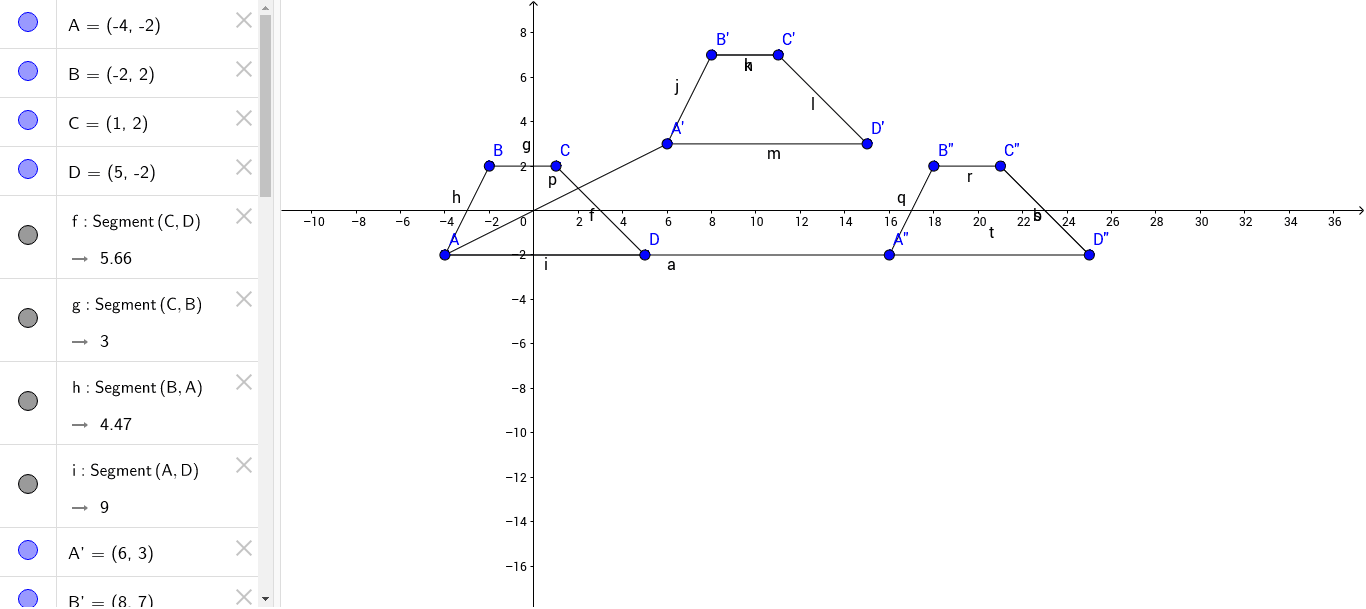
This example demonstrates the dynamic transformation of a trapezoid sliding on a plane. Key math concepts include trapezoid properties, continuity, histograms, inequalities, and Poisson distribution. Construction highlights involve commands like Segment and objects such as points (A, B, C, D, A', B', C', D'), functions (f, g, h, i), and sliders (j, k, l, m, n, p, q, r, s, t, a, b) in GeoGebra. Suitable for high school mathematics education, combining geometric transformations with probability and statistics.
GeoGebra Commands & Parameters
Segment(C, D) → fSegment(C, B) → gSegment(B, A) → hSegment(A, D) → iSegment(B', A') → jSegment(B', C') → kSegment(C', D') → lSegment(A', D') → mSegment(B', C') → nSegment(A', A) → pSegment(B'', A'') → qSegment(B'', C'') → rSegment(C'', D'') → sSegment(D'', A'') → tSegment(A, A'') → aSegment(C'', D'') → b
AI Drawing Prompt Reference
Draw a trapezoid ABCD, then slide it to form trapezoid A'B'C'D'. Use the segment tool to connect the sides of the trapezoids, including AB, BC, CD, DA, A'B', B'C', C'D', and D'A'. Next, draw the slid trapezoid A''B''C''D'' and connect its sides with segments A''B'', B''C'', C''D'', and D''A''. Finally, connect points A to A'', and C'' to D''.
The prompt above was compiled from the original drawing commands and is for reference only.