
Counting Squares in Parallelograms
Loading the math board and drawing, please wait…
In collections
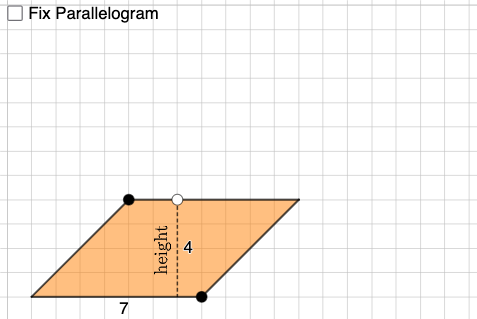
Parallelograms: Counting Squares
This example demonstrates how to count squares to calculate the perimeter of a parallelogram. Key mathematical concepts include parallelogram, rectangle, rhombus, and slope. GeoGebra commands such as Point, Segment, Intersect, and Polygon are used for geometric construction. Suitable for middle school and above students.
GeoGebra Commands & Parameters
Point(xAxis) → APoint(Ray[(0, 0), (1, 0)]) → BPointIn(x ≥ 0 ∧ y ≥ 0 ∧ x ≤ x(B)) → CSegment(C, D) → fIntersect(eq1, f) → ESegment(C, E) → gPoint(g) → FCircle(H, Distance[A, G]) → ePoint(e) → ILine(H, I) → hOrthogonalLine(I, h) → iCircle(I, Distance[G, F]) → kIntersect(k, i, 2) → JLine(J, h) → jCircle(J, Distance[F, C]) → pIntersect(p, j, 1) → KPolygon(H, I, J, K) → q3, h_1, i_1, j_1, k_1Circle(L, Distance[G, B]) → qPoint(q) → MLine(L, M) → lOrthogonalLine(L, l) → mCircle(L, Distance[G, F]) → rIntersect(r, m, 2) → NLine(N, l) → nCircle(N, Distance[F, D]) → sIntersect(s, n, 2) → OPolygon(L, M, O, N) → q4, l_1, m_1, o, n_1Intersect(xAxis, yAxis) → PSegment(P, C) → tSegment(C, D) → p_1Segment(D, B) → q_1Segment(B, P) → r_1Intersect(t, r_1) → QPolygon(Q, B, D, C) → q1, q_2, b, d, cSegment(F, G) → aRotateText(text1, pi / 2) → text2Circle(R, a) → c_1Point(c_1) → SLine(R, S) → f_1OrthogonalLine(R, f_1) → g_1Circle(R, Distance[F, D]) → d_1Intersect(d_1, g_1, 2) → TPolygon(S, R, T) → t1, t_1, s_1, r_2
AI Drawing Prompt Reference
Draw a parallelogram by plotting a point in the first quadrant and connecting it to the x and y axes. Construct the sides and diagonals of the parallelogram. Then, draw a circle with one side as the diameter to find points for constructing squares, and calculate the perimeter. Add text annotations for key concepts like parallelogram, rectangle, rhombus, and slope, showing the relationship between square counting and perimeter calculation.
The prompt above was compiled from the original drawing commands and is for reference only.