
Cornucopia Surface Function Demo
Loading the math board and drawing, please wait…
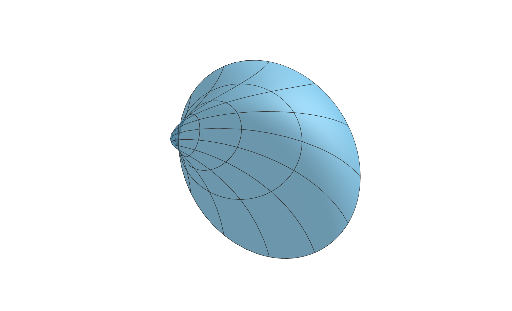
This example demonstrates a dynamic cornucopia-shaped surface with adjustable parameters a, b, c, showcasing 3D surface functions. Key math concepts include surface plotting, function mapping, coordinate transformations, standard deviation, and ratios. Constructed using the Surface command with sliders for parameters a, b, c. Ideal for high school students and math enthusiasts exploring parametric equations, function graphs, and solid geometry visualization.
GeoGebra Commands & Parameters
Surface((ℯ^((b * v)) * cos(v)) + ((ℯ^((a * v)) * cos(u)) * cos(v)), (ℯ^((b * v)) * sin(v)) + ((ℯ^((a * v)) * cos(u)) * sin(v)), (ℯ^((a * v)) * sin(u)), u, 0, (2 * π), v, 0, (2 * π)) → c
AI Drawing Prompt Reference
Create a dynamic 3D surface with a cornucopia-like, horn-shaped form, controlled by adjustable parameters a, b, and c. Define the surface over parameter ranges u∈[0,2π] and v∈[0,2π]. Map (u,v) to 3D coordinates where X and Y are built from combinations involving cos(v), sin(v) and cos(u), sin(u), together with exponential terms using a and b to shape the twisting and growth/decay behavior. Let Z be determined by an expression involving e^(a·v) and sin(u). Render the resulting surface as a single continuous shape and use c as the displayed output for the surface.
The prompt above was compiled from the original drawing commands and is for reference only.