
Constructing Perpendicular Lines in the Coordinate Plane (Slope & Orthogonality)
Loading the math board and drawing, please wait…
In collections
COORDINATE GEOMETRY
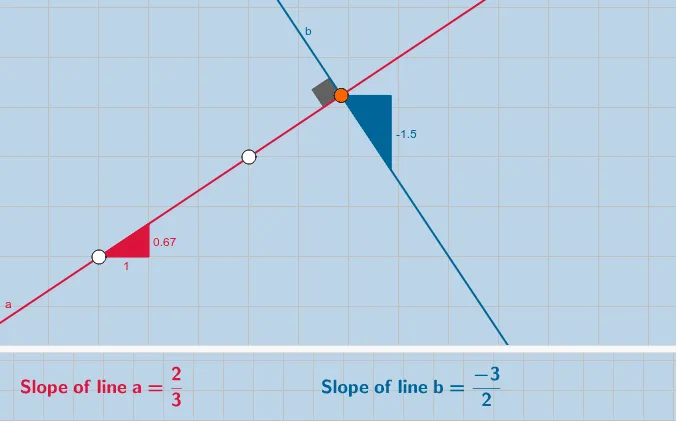
This example demonstrates how to define and construct a perpendicular line on the coordinate plane using slope and orthogonality, then validate the result by measuring the included angle. It centers on key ideas from coordinate geometry: the definition/properties of parallel and perpendicular lines, slope (m) relationships, the orthogonal-line construction, and using angle measurement to confirm that two lines meet at a right angle. Construction in GeoGebra is built from: Line for creating lines, Point for specifying points that determine line positions, Slope to obtain/represent slope information, OrthogonalLine to generate the line through a chosen point that is perpendicular to a given line, Angle to measure the angle between the two lines, and FractionText to display exact slope values or key fractions. Labeled objects (e.g., points like A, B, C, D and multiple text labels) support interactive questions and quick discovery. Suitable for middle and high school students, classroom demonstrations, and self-guided practice on slope, perpendicularity, and geometric construction.
GeoGebra Commands & Parameters
Line(A, B) → aSlope(a) → a_1Point(a) → COrthogonalLine(C, a) → bPoint(b) → DAngle(B, C, D) → αPoint(b) → EPoint(b) → FSlope(b) → mFractionText(a_1) → text2FractionText(m) → text3Line(A_1, B_1) → a_2Slope(a_2) → a_3Point(a_2) → C_1FractionText(a_3) → text2_1
AI Drawing Prompt Reference
Draw two perpendicular lines on the coordinate plane. First, create a line a through points A and B, then find the slope a_1 of line a. Next, construct a perpendicular line b through point C on line a, and take point D on line b. Measure the angle α between lines a and b to confirm they are perpendicular. Finally, calculate the slope m of line b and display the slope value.
The prompt above was compiled from the original drawing commands and is for reference only.