
Constructing Circle Tangents and Angles with Orthogonal Lines
Loading the math board and drawing, please wait…
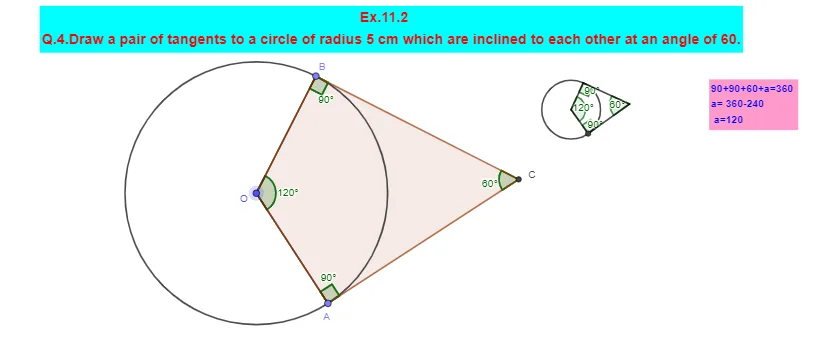
This GeoGebra example demonstrates how to construct a tangent-based configuration to a circle from given points, using orthogonal constructions to enforce the key perpendicularity between a tangent and the radius. It highlights how intersection points, angle measurements, and polygon interior angles work together to reveal and annotate the resulting geometric relationships. The main concepts include circle–tangent geometry, constructing tangents, finding intersections, measuring/labeling angles, and using orthogonal lines (perpendiculars) as a systematic tool. In the build process, commands such as Circle (for the base circle like c), Tangent (to generate tangents), Intersect (to locate intersection points), Segment and Rotate (to form and adjust relevant segments/positions), Angle (to mark angles such as α, β, γ, δ), Point (to create/track key points), OrthogonalLine (to create the perpendicular constraints), and Polygon with InteriorAngles (to organize vertices and display interior angle values) are used to produce and annotate the final diagram. Suitable for middle school to early high school geometry lessons and for students practicing geometric construction and proof visualization.
GeoGebra Commands & Parameters
Circle(O_{1}, 1.1180339887498953) → cTangent(B_{1}, c) → f, gIntersect(c, f) → C_{1}Intersect(c, g) → DSegment(C_{1}, O_{1}) → hSegment(O_{1}, D) → iSegment(D, B_{1}) → jSegment(B_{1}, C_{1}) → kRotate(C_{1}, 60°, B_{1}) → C'Angle(C_{1}, B_{1}, C') → αAngle(O_{1}, C_{1}, B_{1}) → βAngle(B_{1}, D, O_{1}) → γAngle(D, O_{1}, C_{1}) → δCircle(O, 5) → dPoint(Circle[O, 5]) → ASegment(O, A) → lRotate(A, 120°, O) → BAngle(A, O, B) → εSegment(O, B) → mOrthogonalLine(B, m) → nOrthogonalLine(A, l) → pIntersect(n, p) → CPolygon(B, O, A, C) → q1, b, o, a, c_1Angle(O, B, C) → ζAngle(B, C, A) → ηAngle(C, A, O) → θInteriorAngles(q1) → ι, κ, λ, μ
AI Drawing Prompt Reference
Draw a circle and two tangent lines from a point outside the circle. The points where the tangents touch the circle are connected to the center, forming right angles. On the circle, draw two perpendicular line segments intersecting the tangents, forming a quadrilateral with labeled interior angles. Then, draw another circle, select a point on it, and create two 120-degree line segments to form a triangle with labeled interior angles.
The prompt above was compiled from the original drawing commands and is for reference only.