
Constructing Cartesian curves and circles in coordinate geometry
Loading the math board and drawing, please wait…
In collections
intersection: surface-surface, curve-curve
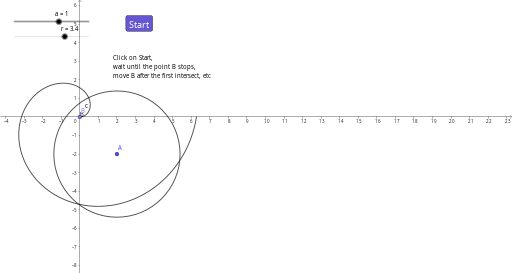
This GeoGebra example demonstrates how to build a coordinate (Cartesian) curve and a circle in the coordinate plane, using key points and parameters to reveal geometric relationships. It focuses on foundational ideas from coordinate geometry: representing curves via Cartesian definitions, defining circles through geometric constraints, and assembling the configuration from points and radius parameters to support interactive exploration. Construction highlights drawn from the provided command summary: the example uses CurveCartesian to create the Cartesian curve, Circle to generate the circle (with parameter r for the radius), and Point to place the essential reference points (such as a, b, A, B). Additional objects like c are produced from these primitives, while button1 and text1 provide user controls and annotations to guide the demonstration. Suitable for high school through early university learning, especially lessons on analytic geometry, geometric construction workflows, and interactive mathematics visualization.
GeoGebra Commands & Parameters
CurveCartesian(((a * t); t), t, 0, (2 * pi)) → bCircle(A, r) → cPoint(b) → B
AI Drawing Prompt Reference
Draw a Cartesian curve and a circle. First, create a curve b using the equation ((a * t); t) with parameter t in the range from 0 to 2π. Then, draw a circle c centered at point A with radius r. Finally, mark a point B on the curve b.
The prompt above was compiled from the original drawing commands and is for reference only.