
Circle Equation: Constructing a Circle via Orthogonal Geometry
Loading the math board and drawing, please wait…
In collections
geometriadinamica.es
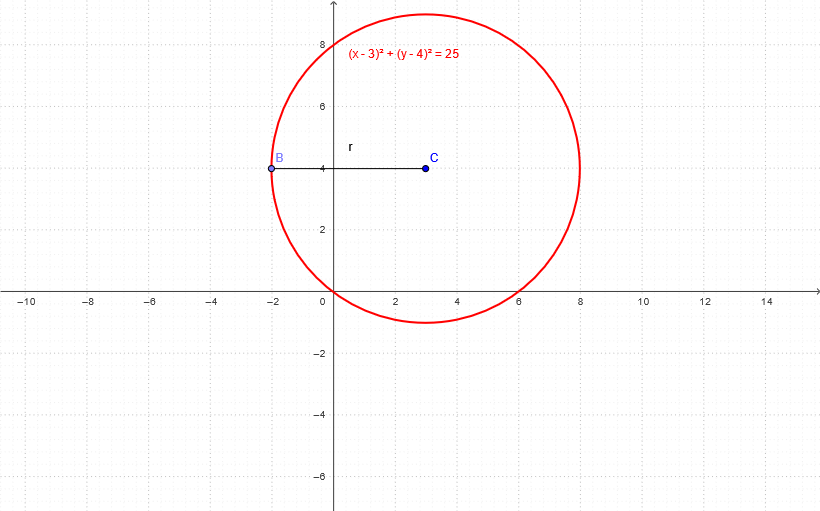
This example demonstrates how to construct a circle and connect its geometry to the idea of a circle’s equation using dynamic geometric construction in GeoGebra. It focuses on the foundational concepts of circle definition—center and radius—and how orthogonality (perpendicular/orthogonal lines) can guide the construction. The key steps are: using OrthogonalLine to create an auxiliary perpendicular relation, using Point to place the required reference points (center and other defining points), using Circle to generate the circle object, and using Segment to form supporting line segments for the construction. The involved GeoGebra objects include the circle C, points a, B, and c, and the radius parameter r. Suitable for secondary-school geometry through coordinate-geometry transition, and for lessons or self-study that aim to link analytic “circle equation” thinking with concrete geometric construction.
GeoGebra Commands & Parameters
OrthogonalLine(C, yAxis) → aPoint(a) → BCircle(C, B) → cSegment(C, B) → r
AI Drawing Prompt Reference
Construct a circle by first drawing an auxiliary line perpendicular to the y-axis, then placing a point on this line as a reference point on the circle's circumference. Use the center and this boundary point to define and generate the circle, and connect the center to the boundary point to form a radius segment illustrating the circle's definition.
The prompt above was compiled from the original drawing commands and is for reference only.