
Constructing an Isosceles Triangle and Measuring Its Perimeter
Loading the math board and drawing, please wait…
In collections
Addition and Subtraction
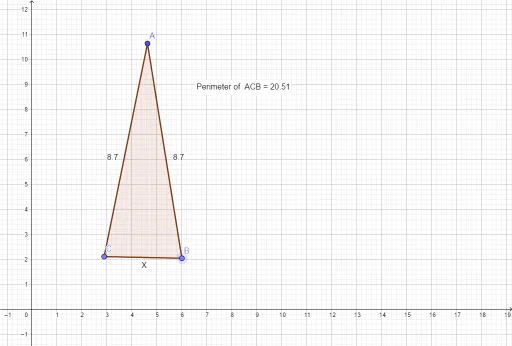
①This example shows how to construct an isosceles triangle in GeoGebra and dynamically measure its perimeter, visually confirming that two sides are equal. ②Core math concepts include the definition of an isosceles triangle (two equal sides), perimeter calculation, and relationships among points, segments, and polygons. ③Construction steps: use Point to create vertices A, B, C; Segment to draw sides f, g, b, a, c; Polygon to form triangle t1; Perimeter to compute perimetert1; and Textt1/Pointt1 to display the perimeter value at a labeled location. ④Ideal for middle school geometry classes to explore triangle properties and practice dynamic geometry software.
GeoGebra Commands & Parameters
Point(Circle[A, 8.7]) → BSegment(A, B) → fPoint(Circle[A, 8.7]) → CSegment(A, C) → gSegment(C, B) → XPolygon(A, C, B) → t1, b, a, cPerimeter(t1) → perimetert1PointIn(t1) → Pointt1
AI Drawing Prompt Reference
Draw an isosceles triangle with dynamically displayed perimeter, verifying the equality of the two equal sides. Create two points equidistant from a vertex, connect them to form the two equal sides, then connect these two points to form the base, completing the triangle. Calculate and display the perimeter of the triangle, placing the numerical value near the triangle.
The prompt above was compiled from the original drawing commands and is for reference only.