
Interactive Rectangle with Related Geometry
Loading the math board and drawing, please wait…
In collections
Addition and Subtraction
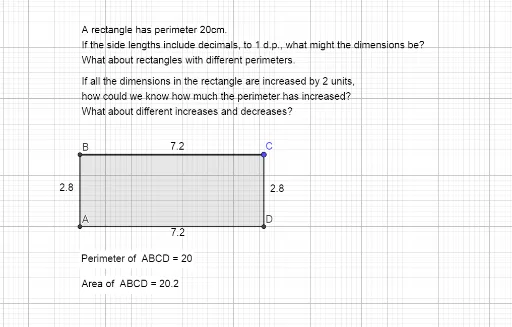
This example demonstrates how to construct a rectangle and its related geometric elements interactively, including normal distribution curves, circumcircle, ellipse, etc. Core mathematical concepts involve coordinate geometry, function graphing, geometric construction, and differential equations. It is constructed using GeoGebra commands like Intersect, OrthogonalLine, Polygon, Perimeter, and PointIn. Suitable for high school students and teachers to explore geometric and functional relationships, deepening understanding of related concepts.
GeoGebra Commands & Parameters
Intersect(xAxis, yAxis) → AOrthogonalLine(C, yAxis) → fOrthogonalLine(C, xAxis) → gIntersect(f, yAxis) → BIntersect(g, xAxis) → DPolygon(A, B, C, D) → q1, a, b, c, dPerimeter(q1) → perimeterq1PointIn(q1) → Pointq1_1PointIn(q1) → Pointq1
AI Drawing Prompt Reference
Draw a rectangle and display its related geometric elements, including normal distribution curves, circumcircle, and ellipse. Start by identifying the intersection point of the coordinate axes, then draw lines perpendicular to the axes from this point to get two vertices on the x-axis and y-axis, respectively. Connect these four vertices to form the rectangle. Next, calculate the perimeter of the rectangle and mark a point on it. Finally, plot the normal distribution curves, circumcircle, and ellipse related to the rectangle, showcasing the connection between geometry and functions.
The prompt above was compiled from the original drawing commands and is for reference only.