
Calculating Area of Composite Figures Using a Quilt Pattern
Loading the math board and drawing, please wait…
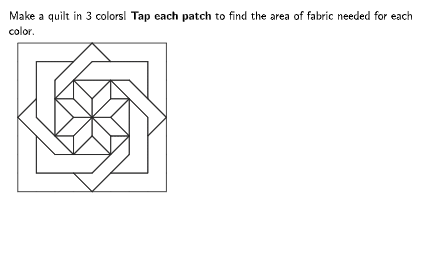
This example demonstrates how to calculate the area of composite figures by decomposing quilt pattern shapes. Key math concepts include triangles, parallelograms, trapezoids, circles, and composite figure area calculations. GeoGebra commands like Max, Element, Append, Join, Polygon, Rotate, Flatten, Zip, Mod, TableText, and Sequence are used to construct and manipulate the shapes. Suitable for grades 6-8, this lesson helps students learn and practice area calculations for geometric figures.
GeoGebra Commands & Parameters
Max({Length[data1], Length[data2], Length[data3]}) → maxRowsMax(0, maxRows - 1) → numZerosElement({"", "0", "00", "000", "0000", "00000", "000000", "0000000", "00000000", "000000000", "0000000000", "00000000000"}, numZeros + 1) → zeroStrAppend(Sequence["\phantom{1}", A, 1, maxRows + 1], "Total Area") → col0Join({{(("\cellcolor{" * colorPURPLE) * "}{Purple}")}, Sequence[If[A ≤ Length[data1], ("~" * data1(A)), ""], A, 1, maxRows], {(If[Sum[data1] < 10, "~", ""] * Sum[data1])}}) → col1Join({{(("\cellcolor{" * colorORANGE) * "}{Orange}")}, Sequence[If[A ≤ Length[data2], ("~" * data2(A)), ""], A, 1, maxRows], {(If[Sum[data2] < 10, "~", ""] * Sum[data2])}}) → col2Join({{(("\cellcolor{" * colorGRAY) * "}{Gray}")}, Sequence[If[A ≤ Length[data3], ("\,\,\," * data3(A)), ""], A, 1, maxRows], {(If[Sum[data3] < 10, "\,\,\,", ""] * Sum[data3])}}) → col3Polygon({(1, 7), (1, 4), (2, 3), (2, 6), (3, 7)}) → poly11Polygon({(3, 6), (6, 6), (7, 5), (7, 7), (4, 7)}) → poly12Polygon({(1, 3), (1, 1), (4, 1), (5, 2), (2, 2)}) → poly13Polygon({(5, 1), (7, 1), (7, 4), (6, 5), (6, 2)}) → poly14Polygon({(2, 5), (3, 5), (4, 4), (3, 4)}) → poly15Rotate(poly15, (3 * pi / 2), (4, 4)) → poly16Rotate(poly15, pi, (4, 4)) → poly17Polygon({(2, 5), (4, 7), (5, 7), (4, 8), (2, 6)}) → poly21Rotate(poly21, ((-pi)) / 2, (4, 4)) → poly22Rotate(poly21, (-pi), (4, 4)) → poly23Rotate(poly21, pi / 2, (4, 4)) → poly24Rotate(poly15, pi / 2, (4, 4)) → poly18Polygon({(4, 4), (4, 5), (3, 6), (3, 5)}) → poly25Rotate(poly25, ((-pi)) / 2, (4, 4)) → poly26Rotate(poly25, pi, (4, 4)) → poly27Rotate(poly25, pi / 2, (4, 4)) → poly28Polygon({(0, 4), (0, 8), (4, 8), (3, 7), (1, 7), (1, 5)}) → poly31Rotate(poly31, ((-pi)) / 2, (4, 4)) → poly32Rotate(poly31, pi, (4, 4)) → poly33Rotate(poly31, pi / 2, (4, 4)) → poly34Polygon({(2, 3), (2, 5), (3, 4)}) → poly35Rotate(poly35, ((-pi)) / 2, (4, 4)) → poly36Rotate(poly35, pi, (4, 4)) → poly37Rotate(poly35, pi / 2, (4, 4)) → poly38Polygon({(2, 5), (3, 5), (3, 6)}) → poly39Rotate(poly39, ((-pi)) / 2, (4, 4)) → poly39bRotate(poly39, pi, (3.9816581927706727, 3.9816581927706722)) → poly39cRotate(poly39, pi / 2, (4, 4)) → poly39dFlatten(Sequence[Zip[Rotate[A, B, (4, 4)], A, {poly11, poly15, poly21, poly25, poly31, poly35, poly39}], B, 0, (3 * pi / 2), pi / 2]) → outlinesZip((("SetLayer(poly" * A) * ",4)"), A, polyNameExtensions) → cmdResetLayersZip((("SetFixed(poly" * A) * ",true,true)"), A, polyNameExtensions) → cmdUnlockPiecesMod(outlineIndex, 7) → pieceTypeElement({0, 3, 0, 0, 0, 5, 0, 0}, pieceType + 1) → numSquaresElement({1, 2, 2, 5, 2, 2, 2, 1}, pieceType + 1) → numTrianglesPolygon({LegendAnchor, LegendAnchor + (1, 0), LegendAnchor + (1, 1), LegendAnchor + (0, 1)}) → legendSquarePolygon({LegendAnchor + (4, 0), LegendAnchor + (5, 0), LegendAnchor + (5, 1)}) → legendTriangleTableText(col0, col1, col2, col3, tableFormatStr) → dataTableFlatten(Sequence[Zip[Rotate[A, B, (4, 4)], A, {poly11, poly15}], B, 0, (3 * pi / 2), pi / 2]) → color1piecesFlatten(Sequence[Zip[Rotate[A, B, (4, 4)], A, {poly21, poly25}], B, 0, (3 * pi / 2), pi / 2]) → color2piecesFlatten(Sequence[Zip[Rotate[A, B, (4, 4)], A, {poly31, poly35, poly39}], B, 0, (3 * pi / 2), pi / 2]) → color3PiecesSequence(true, i, 1, 28) → allCoversJoin({Sequence[Segment[AnchorA + (i, 0), AnchorA + (i, 8)], i, 1, 7], Sequence[Segment[AnchorA + (0, i), AnchorA + (8, i)], i, 1, 7]}) → quiltGrid
AI Drawing Prompt Reference
Draw a composite figure composed of various geometric shapes, including triangles, parallelograms, trapezoids, and circles. Start by drawing a heptagon, then rotate multiple small polygons around a central point to form a complex pattern. Finally, combine these shapes based on their rotation angles and types to create a complete pattern and calculate and display the area of each shape.
The prompt above was compiled from the original drawing commands and is for reference only.