
Constructing a Parallelogram by Steve Phelps
Loading the math board and drawing, please wait…
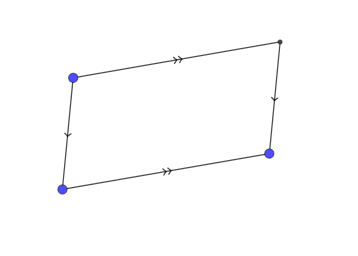
This example demonstrates the construction of a parallelogram. It involves key mathematical concepts such as parallel lines, segments, and intersections. Using GeoGebra commands like Segment, Line, and Intersect, a parallelogram can be constructed. Suitable for students at the junior high school level and above for geometric construction.
GeoGebra Commands & Parameters
Segment(A, B) → fSegment(B, C) → gLine(A, g) → hLine(C, f) → iIntersect(h, i) → DSegment(D, C) → jSegment(A, D) → k
AI Drawing Prompt Reference
Draw a parallelogram. First, draw a line segment AB. Then, draw a line segment BC from point B. Next, draw a line through point A parallel to BC, and a line through point C parallel to AB. These two lines intersect at point D. Then, draw a line segment from D to C, and a line segment from A to D. This creates a parallelogram.
The prompt above was compiled from the original drawing commands and is for reference only.