
Constructing a Parallel Through a Point (Rhombus Method)
Loading the math board and drawing, please wait…
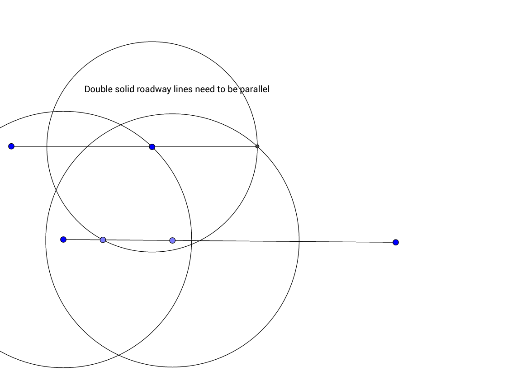
This GeoGebra example demonstrates a classic geometric construction: drawing a line through a given point parallel to a given line, using the rhombus method. The construction relies on the property that opposite sides of a rhombus are parallel, so by constructing a rhombus with the given point as one vertex and two points on the given line as adjacent vertices, the opposite side provides the desired parallel line. The core mathematical concepts include parallel lines, rhombus properties, and basic Euclidean construction. From the construction summary, the commands used are Segment, Point, Circle, and Intersect, with objects including points A, B, C, D, E, F, G, circles c and d, segments f and d_1, auxiliary points A_1 and C_1, and text1. The typical steps involve drawing a circle centered at the given point to intersect the line, then using those intersection points to construct equal-radius circles, and finally connecting the intersection of those circles to the given point. This example is suitable for middle school geometry lessons to illustrate the logic of compass-and-straightedge constructions and the application of geometric theorems, and also serves as an introductory GeoGebra exercise for combining basic construction tools.
GeoGebra Commands & Parameters
Segment(A, B) → fPoint(f) → DCircle(C, Segment[C, D]) → cPoint(f) → ECircle(A, Segment[C, A]) → dCircle(A_1, Segment[C_1, A_1]) → d_1Intersect(c, d_1, 1) → FSegment(F, G) → g
AI Drawing Prompt Reference
Draw a horizontal base segment with two points on it. Choose a point outside the segment. Draw a circle centered at this outside point, intersecting the base segment at two points. Using each intersection as a center, draw two circles with radius equal to the distance from that center to the outside point. These two circles intersect at a point on the same side of the base segment. Connect this intersection point to the outside point with a segment. Finally, draw a line through the outside point parallel to this connecting segment. The figure includes the base segment, two auxiliary circles, two equal-radius circles, the connecting segment, and the final parallel line.
The prompt above was compiled from the original drawing commands and is for reference only.