
Sum of Line Segments by kmacken20
Loading the math board and drawing, please wait…
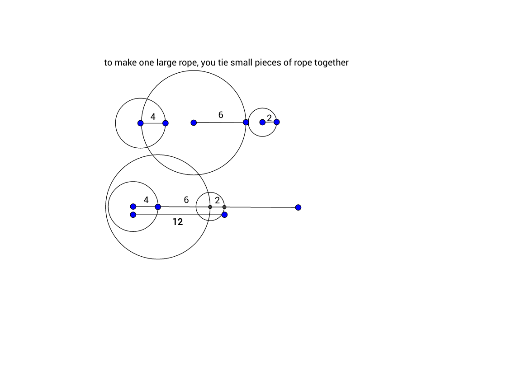
This example demonstrates constructing and summing line segments using GeoGebra. It involves core concepts like line segments, polygons, vectors, and coordinate geometry. Key GeoGebra commands used are Segment, Circle, and Intersect, with objects like points A, B, C, D, E, F. Suitable for high school mathematics teaching, illustrating line segment summation and geometric construction.
GeoGebra Commands & Parameters
Segment(A, B) → fSegment(C, D) → gSegment(E, F) → hSegment(G, H) → iCircle(C, Segment[C, D]) → cSegment(C_1, D_1) → g_1Circle(C_1, Segment[C_1, D_1]) → c_1Circle(E, Segment[E, F]) → dSegment(E_1, F_1) → h_1Circle(E_1, Segment[E_1, F_1]) → d_1Circle(G, Segment[G, H]) → eSegment(G_1, H_1) → i_1Circle(G_1, Segment[G_1, H_1]) → e_1Intersect(e_1, f, 2) → ISegment(J, K) → jIntersect(d_1, f, 1) → L
AI Drawing Prompt Reference
Draw a horizontal baseline segment. Place four pairs of equal-length segments along it. For each pair, start with the first segment, then use its endpoint as center and its length as radius to draw a circle intersecting the baseline, creating a new endpoint for the second equal segment. Repeat for all four pairs, connecting them end-to-end. Finally, from the baseline's end, connect the endpoints of the copied segments to form a polyline, visually representing the sum of the segment lengths.
The prompt above was compiled from the original drawing commands and is for reference only.