
Orthocenter of a Triangle by kmacken20
Loading the math board and drawing, please wait…
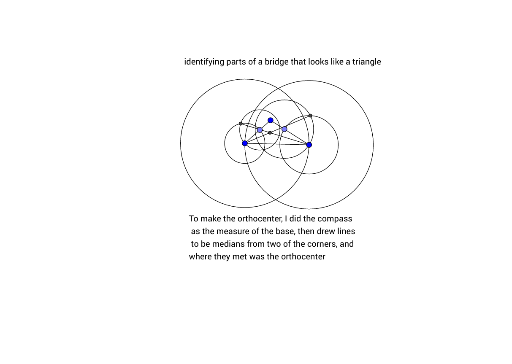
This example demonstrates the orthocenter of a triangle, which is the point where the three altitudes of a triangle intersect. Using GeoGebra commands such as Segment, Point, Circle, and Intersect, one can construct a triangle and find its orthocenter. Suitable for students at the middle school level and above.
GeoGebra Commands & Parameters
Segment(A, B) → fSegment(B, C) → gSegment(C, A) → hSegment(C_1, A_1) → h_1Segment(A_2, B_1) → f_1Point(f_1) → D_2Circle(C, Segment[A, C]) → cCircle(A, Radius[c]) → dPoint(f) → DCircle(A, Segment[D, A]) → eSegment(A_4, B_2) → f_2Point(f_2) → D_3Circle(A_4, Segment[D_3, A_4]) → e_1Intersect(e, e_1, 1) → ESegment(C, E) → iPoint(g) → FCircle(C, Segment[C, F]) → kSegment(B_3, C_4) → g_1Point(g_1) → F_1Circle(C_4, Segment[C_4, F_1]) → k_1Intersect(k, k_1, 2) → GSegment(A, G) → jIntersect(i, j) → H
AI Drawing Prompt Reference
Draw a triangle and construct the altitudes from each vertex to the opposite side, finding their intersection point, which is the orthocenter. Start by drawing the triangle's sides, then draw the altitude from each vertex, and finally mark the intersection point of these altitudes as the orthocenter.
The prompt above was compiled from the original drawing commands and is for reference only.