
A Right-Angle Request
Loading the math board and drawing, please wait…
In collections
Satz des Pythagoras - Einführung
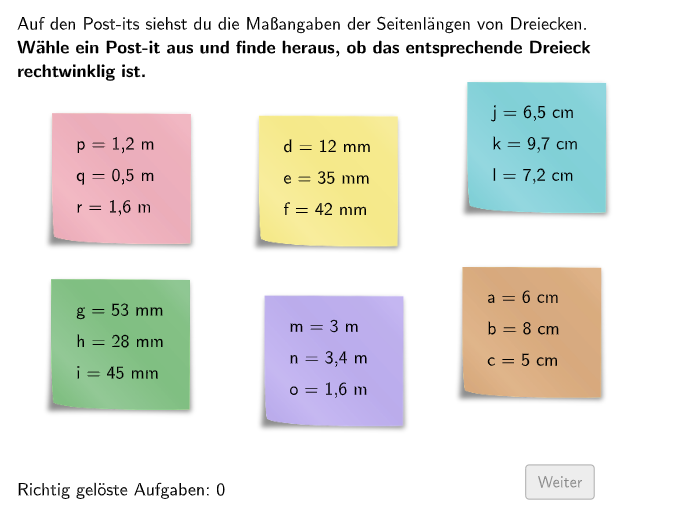
A right-angle request! In this task, a calculator is recommended. This task is suitable for 7-8 grade students, helping them check if a triangle is a right-angled triangle by reversing the Pythagorean theorem. Using GeoGebra, students can interactively explore the properties of right-angled triangles. The task uses various GeoGebra commands and objects, including SelectedIndex, If, Zip, Join, etc. It is suitable for learning coordinate geometry and geometric construction.
GeoGebra Commands & Parameters
SelectedIndex(DropDown7) → input7SelectedIndex(DropDown6) → input6If(rechtwinkelig, 2, 3) → sol7If(rechtwinkelig, 2, 3) → sol6Zip(Text[(("$\textsf{" * m) * "²\vphantom{Öj}}$")], m, listVariables) → listVariablesSquareJoin({{"$\textsf{~~~\vphantom{Öj}}$"}, listVariablesSquare}) → DropDown2SelectedIndex(DropDown2) → input2Join({{"$\textsf{~~~\vphantom{Öj}}$"}, listVariablesSquare}) → DropDown1SelectedIndex(DropDown1) → input1Join({{"$\textsf{~~~\vphantom{Öj}}$"}, listVariablesSquare}) → DropDown3SelectedIndex(DropDown3) → input3SelectedIndex(DropDown0) → input0Textfield(input4) → Eingabefeld4Textfield(input5) → Eingabefeld5Shuffle(Sequence[Random[0, 10], i, 1, 100]) → randomNosForX, {6, 2, 5, 6, 0, 5, 7, 8, 0, 6, 1, 8, 9, 2, 0, 7, 3, 0, 7, 5, 7, 0, 2, 6, 7, 3, 1, 4, 4, 0, 2, 10, 4, 3, 7, 7, 4, 4, 6, 7, 3, 8, 6, 5, 3, 6, 10, 4, 1, 1, 3, 0, 10, 6, 1, 10, 3, 5, 2, 10, 8, 3, 9, 10, 0, 10, 6, 1, 7, 6, 0, 6, 4, 8, 0, 2, 3, 1, 3, 10, 6, 10, 1, 10, 4, 3, 1, 2, 7, 5, 6, 3, 2, 9, 8, 1, 7, 2, 3, 2}Element(randomNosForX, Mod[questionCount, 100] + 1) → numXShuffle(Sequence[Random[0, 10], i, 1, 100]) → randomNosForY, {4, 1, 2, 0, 0, 2, 5, 7, 3, 8, 8, 10, 10, 7, 3, 3, 0, 0, 10, 3, 7, 2, 2, 9, 7, 0, 8, 1, 8, 3, 0, 3, 3, 4, 5, 0, 10, 10, 5, 7, 1, 8, 10, 9, 6, 7, 1, 3, 6, 10, 3, 5, 5, 10, 4, 9, 9, 6, 7, 8, 2, 7, 0, 4, 9, 1, 4, 3, 0, 9, 5, 4, 3, 1, 9, 9, 5, 5, 1, 3, 2, 5, 7, 9, 9, 6, 10, 3, 7, 10, 6, 7, 3, 8, 3, 3, 9, 0, 9, 5}Element(randomNosForY, Mod[questionCount, 100] + 1) → numYAppend(true, Sequence[If[randomNosForX(i) ≟ randomNosForX(i - 1), false, true], i, 2, 100]) → stayXAppend(true, Sequence[If[randomNosForY(i) ≟ randomNosForY(i - 1), false, true], i, 2, 100]) → stayYRemove(Sequence[If[stayX(i), randomNosForX(i), 0], i, 1, 100], Sequence[0, i, 1, 100]) → randomNosForXwithoutRepeatElement(randomNosForXwithoutRepeat, Mod[questionCount, Length[randomNosForXwithoutRepeat]] + 1) → numXwithoutRepeatElement({2, 3}, part) → triesJoin(Sequence[Shuffle[Sequence[1, maxexnum]], m, 1, floor(110 / maxexnum)]) → listExnumSequence(Sort[listNumsAllABC(m), listNumsABCorder(m)], m, 1, 6) → listNumsAll123If(startpage ∨ endpage, listPosAll(listPosNum(2)), Pos0) → P2If(startpage ∨ endpage, listPosAll(listPosNum(3)), Pos0) → P3If(startpage ∨ endpage, listPosAll(listPosNum(4)), Pos0) → P4If(startpage ∨ endpage, listPosAll(listPosNum(5)), Pos0) → P5If(startpage ∨ endpage, listPosAll(listPosNum(6)), Pos0) → P6If(startpage ∨ endpage, listPosAll(listPosNum(1)), Pos0) → P1Defined((input4 * input5)) → fixedDropDown6Text("\textsf\scriptsize{nicht rechtwinklig}", P1 + posTextRechtwinkelig, true, true, -1) → TextRechtwinkelig1Text("\textsf\scriptsize{nicht rechtwinklig}", P2 + posTextRechtwinkelig, true, true, -1) → TextRechtwinkelig2Text("\textsf\scriptsize{rechtwinklig}", P3 + posTextRechtwinkelig, true, true, -1) → TextRechtwinkelig3Text("\textsf\scriptsize{rechtwinklig}", P4 + posTextRechtwinkelig, true, true, -1) → TextRechtwinkelig4Text("\textsf\scriptsize{rechtwinklig}", P5 + posTextRechtwinkelig, true, true, -1) → TextRechtwinkelig5Text("\textsf\scriptsize{nicht rechtwinklig}", P6 + posTextRechtwinkelig, true, true, -1) → TextRechtwinkelig6Rotate(A1 + ((listFactors(1), 0) * listNumsAllABC(1, 3)), 46.5°, A1) → B1Intersect(Circle[A1, (listNumsAllABC(1, 2) * listFactors(1))], Circle[B1, (listNumsAllABC(1, 1) * listFactors(1))], 1) → C1Rotate(A2 + ((listFactors(2), 0) * listNumsAllABC(2, 3)), 44°, A2) → B2Rotate(A3 + ((listFactors(3), 0) * listNumsAllABC(3, 3)), -46.5°, A3) → B3Rotate(A4 + ((listFactors(4), 0) * listNumsAllABC(4, 3)), 46.5°, A4) → B4Rotate(A5 + ((listFactors(5), 0) * listNumsAllABC(5, 3)), 46.5°, A5) → B5Rotate(A6 + ((listFactors(6), 0) * listNumsAllABC(6, 3)), 220°, A6) → B6Intersect(Circle[A2, (listNumsAllABC(2, 2) * listFactors(2))], Circle[B2, (listNumsAllABC(2, 1) * listFactors(2))], 1) → C2Intersect(Circle[A3, (listNumsAllABC(3, 2) * listFactors(3))], Circle[B3, (listNumsAllABC(3, 1) * listFactors(3))], 1) → C3Intersect(Circle[A4, (listNumsAllABC(4, 2) * listFactors(4))], Circle[B4, (listNumsAllABC(4, 1) * listFactors(4))], 1) → C4Intersect(Circle[A5, (listNumsAllABC(5, 2) * listFactors(5))], Circle[B5, (listNumsAllABC(5, 1) * listFactors(5))], 1) → C5Intersect(Circle[A6, (listNumsAllABC(6, 2) * listFactors(6))], Circle[B6, (listNumsAllABC(6, 1) * listFactors(6))], 1) → C6Segment(B1, C1) → a1Segment(B2, C2) → a2Segment(B3, C3) → a3Segment(B4, C4) → a4Segment(B5, C5) → a5Segment(B6, C6) → a6Segment(B1, A1) → c1Segment(B2, A2) → c2Segment(B3, A3) → c3Segment(B4, A4) → c4Segment(B5, A5) → c5Segment(B6, A6) → c6Segment(A1, C1) → b1Segment(A2, C2) → b2Segment(A3, C3) → b3Segment(A4, C4) → b4Segment(A5, C5) → b5Segment(A6, C6) → b6Join({Sequence[Segment[Corner[4] + (RasterPixMat * ((k * RasterStepXY), 0)), Corner[4] + (RasterPixMat * ((k * RasterStepXY), RasterMaxY))], k, 0, RasterMaxX / RasterStepXY], Sequence[Segment[Corner[4] + (RasterPixMat * (0, (k * RasterStepXY))), Corner[4] + (RasterPixMat * (RasterMaxX, (k * RasterStepXY)))], k, 0, RasterMaxY / RasterStepXY]}) → RasterStreckenJoin({Sequence[Text[UnicodeToLetter[65 + k], Midpoint[Corner[4] + (RasterPixMat * ((k * RasterStepXY), RasterMaxY)), Corner[4] + (RasterPixMat * (((k + 1) * RasterStepXY), RasterMaxY))], false, true, 0, -1], k, 0, RasterMaxX / RasterStepXY - 1], Sequence[Text[("" * k), Midpoint[Corner[4] + (RasterPixMat * (RasterMaxX, ((k - 1) * RasterStepXY))), Corner[4] + (RasterPixMat * (RasterMaxX, (k * RasterStepXY)))], false, true, 1, 0], k, 1, RasterMaxY / RasterStepXY]}) → RasterBeschriftungJoin({Sequence[Segment[Corner[4] + (RasterPixMat * ((k * RasterStepXY), 0)), Corner[4] + (RasterPixMat * ((k * RasterStepXY), RasterMaxY))], k, RasterMaxX / RasterStepXY, RasterMaxX / RasterStepXY], Sequence[Segment[Corner[4] + (RasterPixMat * (0, (k * RasterStepXY))), Corner[4] + (RasterPixMat * (RasterMaxX, (k * RasterStepXY)))], k, RasterMaxY / RasterStepXY, RasterMaxY / RasterStepXY]}) → RasterAussen
AI Drawing Prompt Reference
Draw an interactive right-angle triangle verification tool interface. There are 6 triangles at different positions on the screen, labeled triangle 1 through triangle 6, each consisting of three vertices. Next to each triangle, there is a dropdown menu for users to select two sides as the legs of a right angle. The interface also includes two input fields for entering numbers and multiple selection dropdowns. When the user makes their selections, the system displays next to each triangle whether it is a right triangle ("rechtwinklig") or not a right triangle ("nicht rechtwinklig") through text. The entire interface is designed for students to interactively verify the converse of the Pythagorean theorem by checking if triangles with given side lengths are right triangles.
The prompt above was compiled from the original drawing commands and is for reference only.