
Connections and Paths
Loading the math board and drawing, please wait…
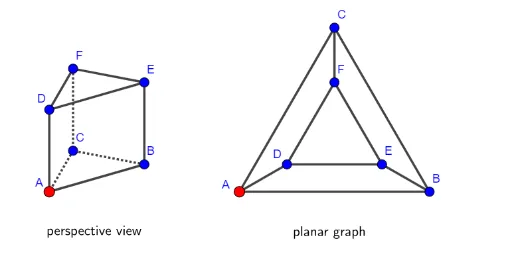
This example demonstrates how to use GeoGebra to draw paths connecting points A, B, and C, and explores geometric shapes through constructing polygons and vectors. Key mathematical concepts include triangles, vectors, and polygons. By using commands like Polygon, Segment, and Vector, complex geometric shapes can be constructed. Suitable for students in middle school and above to learn geometric construction and vector concepts.
GeoGebra Commands & Parameters
Polygon(A, B, C) → driehoek1, c, a, bPolygon(D, E, F) → driehoek2, f, d, eSegment(D, A) → gSegment(F, C) → hSegment(E, B) → iPolygon(G, H, 3) → veelhoek1, j, k, l, IPolygon(J, K, 3) → veelhoek2, m, n, p, LVector(A, J) → uVector(B, K) → vVector(C, L) → wVector(D, G) → qVector(E, H) → rVector(F, I) → tPolygon(AA, BB, CC) → driehoek3, cc, aa, bbPolygon(DD, EE, FF) → driehoek4, ff, dd, eeSegment(CC, FF) → iiSegment(DD, AA) → ggSegment(EE, BB) → hhPoint(ribben1) → PPoint(ribben2) → PP
AI Drawing Prompt Reference
Draw a triangle with points A, B, and C, then draw vectors u, v, and w from A, B, and C respectively. Next, form another triangle with points D, E, and F, and draw vectors q, r, and t from D, E, and F respectively. Then, create a polygon with points G, H, and I, and draw vectors from J, K, and L. Finally, mark points P and PP, and connect points AA, BB, and CC with DD, EE, and FF, as well as CC and FF, DD and AA, EE and BB.
The prompt above was compiled from the original drawing commands and is for reference only.