
Conics via Newton's Method
Loading the math board and drawing, please wait…
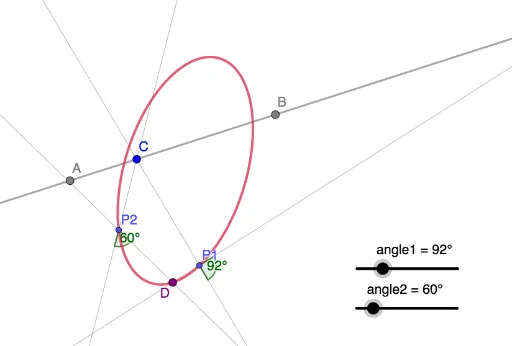
This example demonstrates how to construct conic sections using Newton's Method. Key math concepts involved include conic sections, constructions, power functions, integral calculus, roots, secant lines, and vectors. The construction utilizes GeoGebra commands such as Line, Point, Rotate, Intersect, Locus, and Angle, along with objects like angle1, angle2, A, B, f, C, P1, P2, g, h, g', h', D, loc1, α, β. It is suitable for high school and above students to understand the application of Newton's Method in geometric constructions.
GeoGebra Commands & Parameters
Line(A, B) → fPoint(f) → CLine(C, P1) → gLine(C, P2) → hRotate(g, angle1, P1) → g'Rotate(h, angle2, P2) → h'Intersect(g', h') → DLocus(D, C) → loc1Angle(h, h') → αAngle(g, g') → β
AI Drawing Prompt Reference
Draw a geometric construction to demonstrate how conic sections can be created using Newton's Method. Start by drawing a line segment and marking a point on it. From this point, draw two lines intersecting the segment at two points. Rotate these two lines around their respective intersection points by given angles to form new lines. Find the intersection of these new lines and trace the path of this intersection point as it moves around the original point on the segment. Finally, label the angles between the rotated lines and the original lines to illustrate the geometric construction of conic sections.
The prompt above was compiled from the original drawing commands and is for reference only.