
Congruent Triangles Inside an Equilateral Triangle
Loading the math board and drawing, please wait…
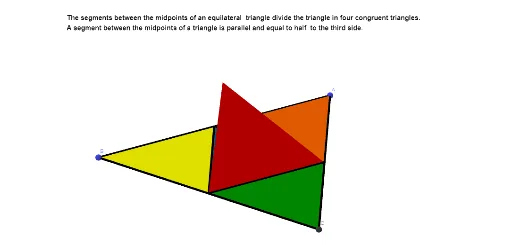
This example demonstrates how to construct several congruent triangles within a given equilateral triangle by using precise geometric placement and rotation. It highlights the phenomenon that, even after positional changes, the triangles remain congruent—i.e., they preserve side lengths and angles. The key mathematical ideas include congruent triangles, rigid motions (especially rotations), midpoint-based construction, and the symmetry properties of an equilateral triangle. In GeoGebra, the construction starts with Polygon to form the main equilateral triangle (and related polygonal regions), Midpoint to locate key points such as edge midpoints, and Segment to draw the required connecting lines. Then Rotate is applied around the appropriate point(s) to generate the corresponding congruent triangles in other locations. The object set includes vertices and derived points (e.g., A, B, C, D, E, F), intermediate geometric entities (segments/polygons such as poly1), and presentation aids like text/graphics (e.g., texte1, image1) to support visual verification. Suitable for middle-school geometry, geometry construction practice, and transformation-based learning for students preparing for contests.
GeoGebra Commands & Parameters
Polygon(A, B, 3, xOyPlane) → poly1, f, g, h, CMidpoint(f) → DMidpoint(h) → EMidpoint(g) → FSegment(D, F) → iSegment(D, E) → jSegment(E, F) → kPolygon(D, B, F) → t1, f_1, d, bRotate(t1, If[a < 3.14, (-a), (-π)], i) → t1'Rotate(t1', If[3.14 < a < (2 * π), (-(a - π)), (-π)], j) → t1''Rotate(t1'', If[(2 * π) < a < (3 * π), a - (2 * π), π], j) → t1'''Rotate(t1''', If[(3 * π) < a < (4 * π), (-(a - (3 * π))), (-π)], k) → t2Rotate(t2, If[(4 * π) < a < (5 * π), a - (4 * π), π], k) → t2'Rotate(t1', If[(5 * π) < a < (6 * π), a - (5 * π), π], i) → t2''Segment(B, D) → lPolygon(F, D, E) → t3, e, f_2, d_1Polygon(F, E, C) → t4, c, f_3, e_1Polygon(D, E, A) → t5, a_1, d_2, e_2
AI Drawing Prompt Reference
Draw an equilateral triangle region in the plane. Mark the midpoints of its three sides as the key points, then connect appropriate midpoint pairs to form small triangles inside the big one. Start from a triangle determined by one vertex and two related midpoints. Using rigid rotations, copy this same triangle to multiple positions within the equilateral triangle by rotating around the relevant shared segment as the rotation axis each time. Perform successive rotations around the corresponding internal edges so that the resulting triangles remain congruent. The final figure should show several congruent small triangles arranged symmetrically inside the equilateral triangle.
The prompt above was compiled from the original drawing commands and is for reference only.