
Cone Unfolding
Loading the math board and drawing, please wait…
In collections
GeoGebra 3D Grafikrechner mit AR - Beispielsammlung
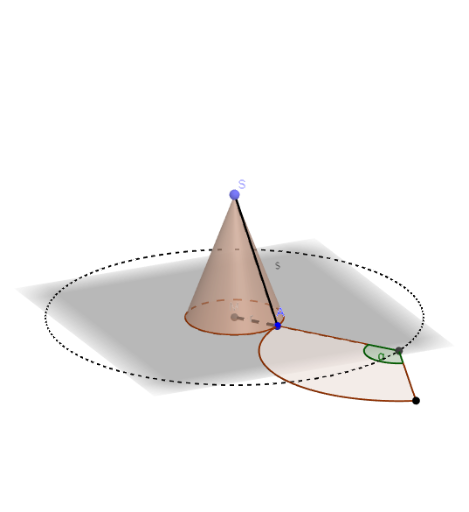
This example demonstrates the unfolding process of a cone and its geometric properties. It involves core math concepts like solid geometry, circles, angles, and segment length calculations. Construction uses commands such as Point, Intersect, Segment, Cone, Ray, Circle, Rotate, CircleSector, Angle, OrthogonalLine, Line to draw the cone, its net, and auxiliary lines. Suitable for high school solid geometry teaching and geometric construction learning.
GeoGebra Commands & Parameters
Point(zAxis) → SIntersect(xAxis, yAxis) → MSegment(M, A) → rCone(M, S, r) → a, c, bRay(M, A) → dSegment(A, S) → sCircle(M, r + s) → eIntersect(d, e, 1) → S_1Rotate(A, α, S_1) → A'CircleSector(S_1, A, A', xOyPlane) → fAngle(d, s) → βOrthogonalLine(A, d, xOyPlane) → gRotate(a, (-γ), g) → a'OrthogonalLine(S_1, xOyPlane) → hRotate(a', δ, h) → a''Angle(A, S_1, A', xOyPlane) → εRotate(A, (-γ), g) → A'_{1}Rotate(S, (-γ), g) → S'Rotate(A'_{1}, δ, h) → BRotate(S', δ, h) → S''Rotate(A, (-γ), g) → A'_{2}Rotate(S, (-γ), g) → S'_{1}Segment(A'_{2}, S'_{1}) → s'Line(M, S) → achse1Rotate(M, (-γ), g) → M'Rotate(M', δ, h) → M''Line(M'', S'') → achse2Rotate(B, (δ / α * 360°), achse2) → B'Segment(S'_{1}, B') → i
AI Drawing Prompt Reference
Draw the unfolding of a cone, showing its lateral surface and base. First, sketch the base circle and lateral surface of the cone, then unfold the lateral surface into a sector. Label key points such as the apex, base center, and sector center. Draw auxiliary lines like generatrices and base radii, and annotate angles and lengths. Finally, compare the unfolded sector with the original cone to illustrate geometric relationships.
The prompt above was compiled from the original drawing commands and is for reference only.