
Cone Construction by P Porras
Loading the math board and drawing, please wait…
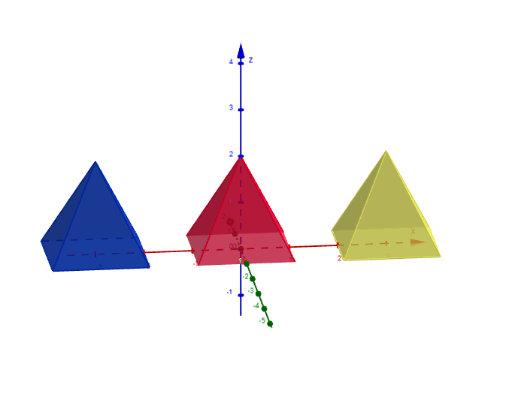
This example demonstrates the geometric construction of a cone, involving solid geometry, vectors, rotation, and translation. Key GeoGebra commands and objects used include Polygon, Pyramid, Vector, Translate, Line, and Rotate. Suitable for high school geometry teaching and construction practice.
GeoGebra Commands & Parameters
Polygon(A, B, 4) → kuvio1, a, b, c, d, C, DPyramid(kuvio1, E) → f, tahkoABE, tahkoBCE, tahkoCDE, tahkoADE, särmäAE, särmäBE, särmäCE, särmäDEPolygon(F, G, 4) → kuvio2, g, h, i, j, H, IPyramid(kuvio2, J) → k, tahkoFGJ, tahkoGHJ, tahkoHIJ, tahkoFIJ, särmäFJ, särmäGJ, särmäHJ, särmäIJVector(K) → uTranslate(k, u) → k'Line(A, D) → lRotate(k', α, l) → k''Polygon(L, M, 4) → kuvio3, m, n, p, q, N, OPyramid(kuvio3, P) → o, tahkoLMP, tahkoMNP, tahkoNOP, tahkoLOP, särmäLP, särmäMP, särmäNP, särmäOPVector(Q) → vTranslate(o, v) → o'Vector(R) → wTranslate(o', w) → o''Line(A, B) → rRotate(o'', (-α), r) → o'''
AI Drawing Prompt Reference
Draw a geometric construction of a cone starting from a quadrilateral, extending to points E and J to form two pyramids, then applying vector rotations and translations to complete the cone, showing dynamic relationships between rotations and translations.
The prompt above was compiled from the original drawing commands and is for reference only.