
Fraction and Geometric Construction Example
Loading the math board and drawing, please wait…
In collections
Prep mathematics
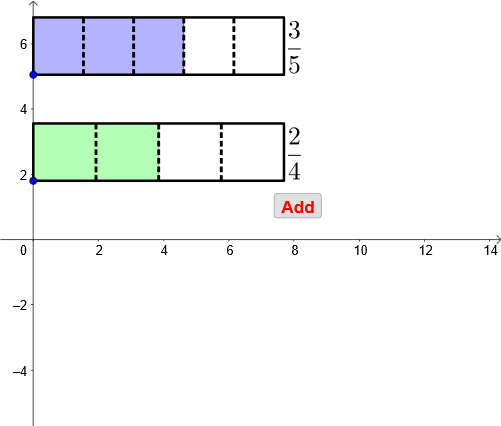
This example demonstrates how to represent fractions through geometric constructions. Key mathematical concepts include fraction representation, ratio relationships, and geometric construction. Construction involves using GeoGebra commands like Point, If, Ray, and FractionText. Suitable for middle school students learning the application of fractions in geometry.
GeoGebra Commands & Parameters
Point(yAxis) → CPoint(Segment[C + (0, h), C + (0, (1.85 * h))]) → BIf(t ≤ 0.5, 0, (2 * (t - 0.5))) → t2If(t ≤ 0.5, (2 * t), 1) → t1Point(Segment[B + (0, h), B + (0, (1.85 * h))]) → ARay((0, 1.9), (0, 2.9)) → fPolygon({A, A + (l, 0), A + (l, h), A + (0, h)}) → poly1Polygon({B, B + (l, 0), B + (l, h), B + (0, h)}) → poly2Sequence(Segment[A + ((i * l / a1), 0), A + ((i * l / a1), h)], i, 1, a1 - 1) → list1Sequence(Segment[B + ((i * l / a2), 0), B + ((i * l / a2), h)], i, 1, a2 - 1) → list2Polygon({A, A + ((b1 * l / a1), 0), A + ((b1 * l / a1), h), A + (0, h)}) → poly3Polygon({B, B + ((b2 * l / a2), 0), B + ((b2 * l / a2), h), B + (0, h)}) → poly4Sequence(Sequence[Segment[A + ((i * l / a1) + (j * l / ((a1 * c1))), 0), A + ((i * l / a1) + (j * l / ((a1 * c1))), h)], j, 1, c1 - 1], i, 0, a1 - 1) → list3, {{}, {}, {}, {}, {}}Sequence(Sequence[Segment[B + ((i * l / a2) + (j * l / ((a2 * c2))), 0), B + ((i * l / a2) + (j * l / ((a2 * c2))), h)], j, 1, c2 - 1], i, 0, a2 - 1) → list4, {{}, {}, {}, {}}If(a1 ≟ a2, true, false) → equaldIf(equald ∧ (Div[b1 + b2, a1] > 0 ∨ GCD[b1 + b2, a1] > 1), true, If[Div[(b1 * c1) + (b2 * c2), (a1 * c1)] > 0 ∨ GCD[(b1 * c1) + (b2 * c2), (a1 * c1)] > 1, true, false]) → simplifyTextfield(a1) → InputBox1Textfield(b1) → InputBox2Textfield(a2) → InputBox3Textfield(b2) → InputBox4Polygon({A', A' + (l, 0), A' + (l, h), A' + (0, h)}) → poly5Polygon({B', B' + ((b2 / a2 * l), 0), B' + ((b2 / a2 * l), h), B' + (0, h)}) → poly6Polygon({A', A' + ((b1 * l / a1), 0), A' + ((b1 * l / a1), h), A' + (0, h)}) → poly7Polygon({B', B' + ((b2 * l / a2), 0), B' + ((b2 * l / a2), h), B' + (0, h)}) → poly8Sequence(Sequence[Segment[A' + ((i * l / a1) + (j * l / ((a1 * c1))), 0), A' + ((i * l / a1) + (j * l / ((a1 * c1))), h)], j, 1, c1 - 1], i, 0, b1 - 1) → list8, {{}, {}, {}}Sequence(Sequence[Segment[B' + ((i * l / a2) + (j * l / ((a2 * c2))), 0), B' + ((i * l / a2) + (j * l / ((a2 * c2))), h)], j, 1, c2 - 1], i, 0, b2 - 1) → list9, {{}, {}}Segment(C - (0, 0.5), C - (0, 1)) → gSegment(C + ((b1 / a1 * l), -0.5), C + ((b1 / a1 * l), -1)) → iSegment(C + ((b1 / a1 * l) + (b2 / a2 * l), -0.5), C + ((b1 / a1 * l) + (b2 / a2 * l), -1)) → jVector(Midpoint[g], Midpoint[i]) → uVector(Midpoint[i], Midpoint[g]) → vVector(Midpoint[i], Midpoint[j]) → wVector(Midpoint[j], Midpoint[i]) → aSequence(Segment[A' + ((i * l / a1), 0), A' + ((i * l / a1), h)], i, 0, b1) → list6Sequence(Segment[B' + ((i * l / a2), 0), B' + ((i * l / a2), h)], i, 0, b2) → list7Sequence(Polygon[{C + ((i * l), 0), C + ((i * l) + l, 0), C + ((i * l) + l, h), C + ((i * l), h)}], i, 1, floor(b1 / a1 + b2 / a2)) → list5Segment(B', B' + ((b2 / a2 * l), 0)) → kSegment(B' + ((b2 / a2 * l), h), B' + (0, h)) → mIf(b1 / a1 + b2 / a2 ≥ 1, true, false) → improperFractionText(b1 / a1 + b2 / a2) → text19FractionText(b1 / a1 + b2 / a2 - 1) → text20Sequence(Sequence[Segment[C + ((i * l / ((a1 * c1))) + (j * l), 0), C + ((i * l / ((a1 * c1))) + (j * l), h)], i, 1, (a1 * c1) - 1], j, 0, If[b1 / a1 + b2 / a2 ≤ 1, 0, 1]) → list10, {{1.7579424658632512, 1.7579424658632512, 1.7579424658632512, 1.7579424658632512}, {1.7579424658632512, 1.7579424658632512, 1.7579424658632512, 1.7579424658632512}}GCD((a2 * b1) + (a1 * b2), (a1 * a2)) → jakaja
AI Drawing Prompt Reference
Draw a geometric figure representing the addition of two fractions. Start by taking point C on the y-axis, then take point B above C to represent the unit length of the first fraction. Next, take point A above B to represent the unit length of the second fraction. Construct rays and polygons to represent the addition of the two fractions. Use input boxes to input the numerators and denominators of the fractions, and construct corresponding geometric shapes based on the input values, including segments, polygons, and fraction texts. Finally, construct polygons and fraction texts to represent the addition result based on the input values.
The prompt above was compiled from the original drawing commands and is for reference only.