
Long Multiplication Demonstration
Loading the math board and drawing, please wait…
In collections
Prep mathematics
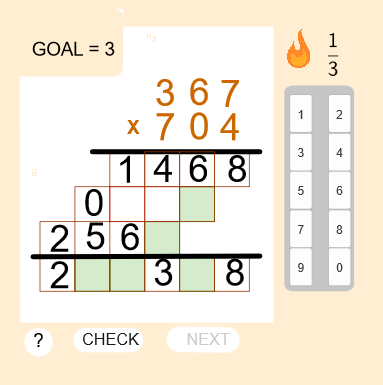
This example demonstrates the process of long multiplication. It involves core concepts of multiplication. Using GeoGebra commands such as Shuffle, Polygon, Segment, etc., it dynamically shows the steps of multiplication. Suitable for high-grade elementary or junior high school students to learn multiplication.
GeoGebra Commands & Parameters
Shuffle({1, 2, 3, 4}) → prob, {1, 4, 2, 3}Polygon(E, F, 4) → poly4, h_1, i_1, j_1, k_1, G, HPolygon(I, J, 4) → poly5, l_1, m_1, n_1, p_1, K, MPolygon(J, N, 4) → poly6, q_1, r_1, s_1, t_1, O, PPolygon(N, Q, 4) → poly7, e_1, f_2, g_2, h_2, R, SPolygon(Q, T, 4) → poly8, i_2, j_2, k_2, l_2, U, VPolygon(W, Z, 4) → poly9, m_2, n_2, p_2, q_2, A_1, B_1Polygon(Z, C_1, 4) → poly10, r_2, s_2, t_2, a_2, D_1, E_1Polygon(C_1, F_1, 4) → poly11, b_2, c_2, d_2, e_2, G_1, H_1Polygon(F_1, I_1, 4) → poly12, f_3, g_3, h_3, i_3, J_1, K_1Polygon(M_1, P_1, 4) → poly13, n_3, p_3, q_3, r_3, Q_1, R_1Polygon(P_1, S_1, 4) → poly14, s_3, t_3, a_3, b_3, T_1, U_1Polygon(S_1, V_1, 4) → poly15, c_3, d_3, e_3, f_4, W_1, Z_1Polygon(V_1, A_2, 4) → poly16, g_4, h_4, i_4, j_4, B_2, C_2Polygon(A_2, L_1, 4) → poly17, j_3, k_3, l_3, m_3, N_1, O_1Polygon(L_1, D_2, 4) → poly18, k_4, l_4, m_4, n_4, E_2, F_2Polygon(G_2, H_2, 4) → poly1, p_4, q_4, r_4, s_4, I_2, J_2Segment(U_2, V_2) → a_5Segment(W_2, Z_2) → b_5Shuffle(L1) → L2, {17, 15, 8, 12, 14, 4, 16, 9, 18, 3, 2, 6, 13, 7, 10, 5, 1, 11}Sort(Take[L2, 1, 5]) → L3Take(L2, 6, 18) → L4Text((p(6) * ((100 * p(1)) + (10 * p(2)) + p(3)))) → Line1Text((p(5) * ((100 * p(1)) + (10 * p(2)) + p(3)))) → Line2Text((p(4) * ((100 * p(1)) + (10 * p(2)) + p(3)))) → Line3Take(Line1, 1, 1) → Answer1Polygon(L, K_2, 4) → poly2, f, h, i, n, L_2, M_2Polygon(N_2, Q_2, 4) → poly3, q, s, t, c, R_2, S_2Take(Line1, 2, 2) → Answer2Take(Line1, 3, 3) → Answer3Take(Line1, 4, 4) → Answer4Take(Line2, 1, 1) → Answer5Take(Line2, 2, 2) → Answer6Take(Line2, 3, 3) → Answer7Take(Line2, 4, 4) → Answer8Take(Line3, 1, 1) → Answer9Take(Line3, 2, 2) → Answer10Take(Line3, 3, 3) → Answer11Take(Line3, 4, 4) → Answer12Text((((100 * p(1)) + (10 * p(2)) + p(3)) * ((100 * p(4)) + (10 * p(5)) + p(6)))) → Line4Take(Line4, 1, 1) → Answer13Take(Line4, 2, 2) → Answer14Take(Line4, 3, 3) → Answer15Take(Line4, 4, 4) → Answer16Take(Line4, 5, 5) → Answer17Take(Line4, 6, 6) → Answer18Circle(H_3, 0.4) → c_1Polygon(U_3, W_3, Z_3, A_4) → white_{s}quare, u_3, w_3, z_3, g
AI Drawing Prompt Reference
Create a dynamic illustration showing the process of long multiplication with multiple quadrilaterals and lines, using different colors and arrangements to demonstrate multiplication steps, suitable for students learning multiplication. The graphic should include several parts, each colored differently and connected by lines, visually representing the steps and results of the multiplication calculation.
The prompt above was compiled from the original drawing commands and is for reference only.