
Concentric Icosahedron and Sphere Construction
Loading the math board and drawing, please wait…
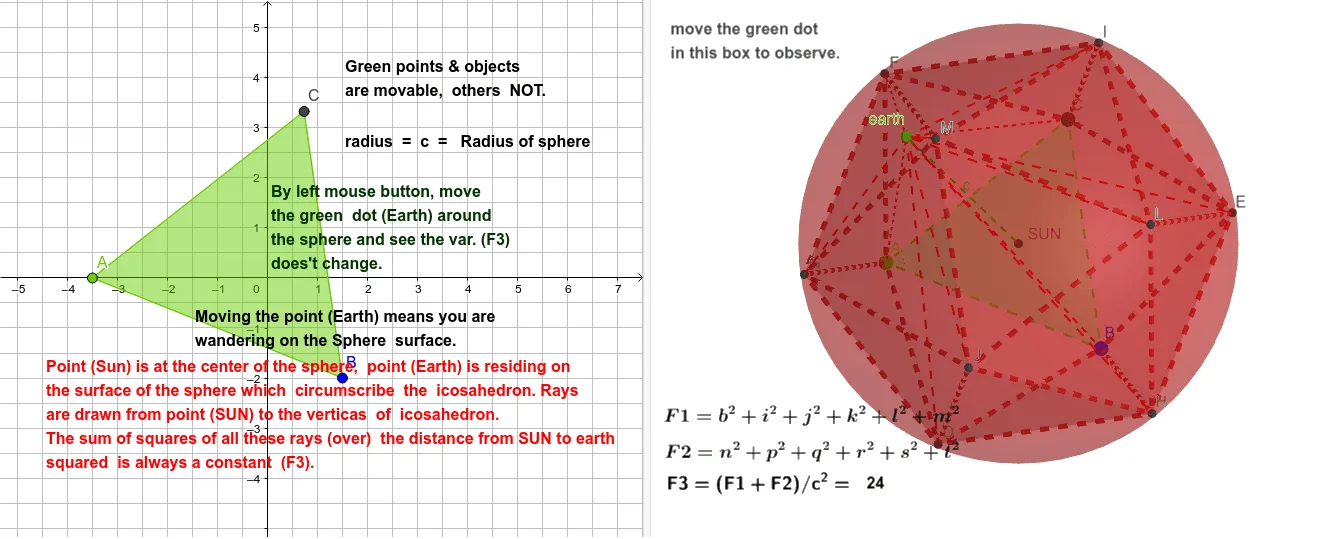
① This example demonstrates a regular icosahedron placed concentrically with its circumscribed sphere, showing the spatial relationships among vertices, edges, faces, and the sphere surface. ② Core mathematical concepts include the symmetry of the regular icosahedron, circumsphere, barycenter, intersection of polyhedra and spheres, and geometric transformations in 3D space. ③ Construction details: Using GeoGebra commands Polygon, Icosahedron, Barycenter, Sphere, PointIn, and Segment, the example builds the icosahedron (object poly1), its barycenter B, the circumsphere f, and multiple vertices (A, C, K, D, etc.) and faces (e.g., faceACF, faceAFG) with edges (edgeAF, edgeCF) to form the complete concentric structure. ④ Suitable for high school or university solid geometry courses, this example helps students understand the relationship between regular polyhedra and spheres, symmetry analysis, and 3D geometric construction techniques.
GeoGebra Commands & Parameters
Polygon(A, B, 3) → poly1, f, g, h, CIcosahedron(poly1, true) → K, D, faceACF, faceAFG, faceADG, faceABD, faceBDH, faceBEH, faceBCE, faceCEI, faceCFI, faceEHL, E, faceEIL, faceILM, faceFIM, faceHJL, faceJLM, faceGJM, faceFGM, faceDHJ, faceDGJ, edgeAF, F, edgeCF, edgeAG, edgeFG, edgeAD, edgeDG, edgeBD, edgeBH, edgeDH, edgeBE, edgeEH, G, edgeCE, edgeCI, edgeEI, edgeFI, edgeEL, edgeHL, edgeIL, edgeIM, edgeLM, edgeFM, H, edgeJL, edgeHJ, edgeJM, edgeGM, edgeGJ, edgeDJ, I, J, L, MBarycenter({A, B, C, D, E, F, G, H, I, J, L, M}, {1, 1, 1, 1, 1, 1, 1, 1, 1, 1, 1, 1}) → SUNSphere(SUN, F) → aPointIn(a) → earthSegment(SUN, earth) → cSegment(C, earth) → bSegment(E, earth) → tSegment(L, earth) → sSegment(H, earth) → rSegment(B, earth) → qSegment(J, earth) → pSegment(D, earth) → nSegment(A, earth) → mSegment(G, earth) → lSegment(M, earth) → kSegment(I, earth) → jSegment(F, earth) → i
AI Drawing Prompt Reference
Draw a concentric regular icosahedron and its circumscribed sphere. Start by creating a triangle with the Polygon command, then expand it into a regular icosahedron. Find the barycenter of the icosahedron and use it as the center to draw the circumscribed sphere. Randomly select several points on the sphere and draw line segments connecting these points to the barycenter.
The prompt above was compiled from the original drawing commands and is for reference only.