
Complex Multiplication as Geometric Transformation
Loading the math board and drawing, please wait…
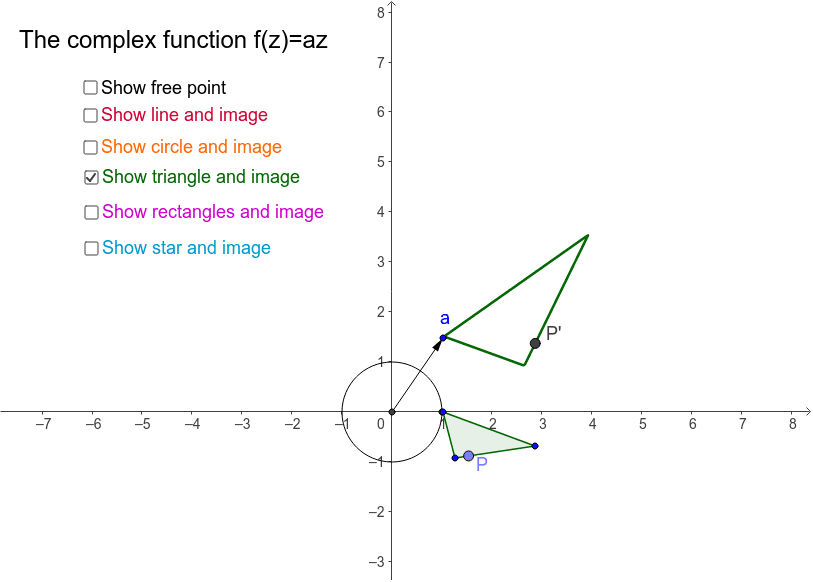
This example demonstrates how multiplying points by a complex number can be shown as a geometric transformation involving scaling and rotation. Key mathematical concepts include complex number multiplication, rotation, and angles. Using GeoGebra commands such as Intersect, Circle, Line, and Point, the geometric meaning of complex number multiplication is visually illustrated. Suitable for high school mathematics education and students learning about complex number geometric transformations.
GeoGebra Commands & Parameters
Intersect(xAxis, yAxis) → PCircle(P, 1) → kIntersect(k, xAxis) → D_1, E_1Line(Q, R) → jPoint(j) → SCircle(D, E) → dPoint(d) → J_1Polygon(A, B, C) → poly1, c, a_1, bVector(F, G) → uOrthogonalLine(F, u) → e_1Point(e_1) → HTranslate(G, u) → G'_1Translate(H, u) → H'_1Polygon(F, H, H'_1, G) → poly2, f, h, h', gVector(F, G'_1) → vTranslate(F, v) → F'Translate(H, v) → H'Translate(H'_1, v) → ITranslate(G, v) → G'Polygon(F', H', I, G') → poly2', f', h'_1, i, g'Translate(F', v) → F''Translate(H', v) → H''Translate(I, v) → I'Translate(G', v) → G''Polygon(F'', H'', I', G'') → poly2'', f'', h'', i', g''Point(poly1) → LPoint(poly2) → MPoint(poly2') → NPoint(poly2'') → OLocus(z, J_1) → loc1Locus(z_1, L) → loc2Locus(z_2, M) → loc3Locus(z_3, N) → loc4Locus(z_4, O) → loc5Locus(z_5, S) → loc6Vector(P, a) → wPoint(k) → KLine(z_6, z_5) → qIntersect(q, j) → TPolygon(U, V, 5) → poly3, u_1, v_1, r, s, t, W, Z, A_1Polygon(U, Z, V, A_1, W) → poly4, u_2, z_7, v_2, a_2, w_1Point(poly4) → B_1Locus(z_8, B_1) → loc7Intersect(yAxis, xAxis) → C_1Angle(D_1, P, a) → αSegment(C_1, J) → d_1Segment(C_1, J') → f_1Angle(J, C_1, J') → εSegment(C_1, a) → g_1
AI Drawing Prompt Reference
Draw a geometric transformation showing complex multiplication. Start with an intersection point of two axes, draw a unit circle centered at this point. Mark a point on the circle and draw lines to the axes. Connect two points on the circle. Create a circle using the center and two intersection points. Draw line segments and their orthogonal lines. Mark points on these lines and form multiple polygons to illustrate the scaling and rotation effects of complex multiplication.
The prompt above was compiled from the original drawing commands and is for reference only.