
Geometric Visualization of Möbius Transformations: Circles and Angle Corresponde
Loading the math board and drawing, please wait…
In collections
geometriadinamica.es
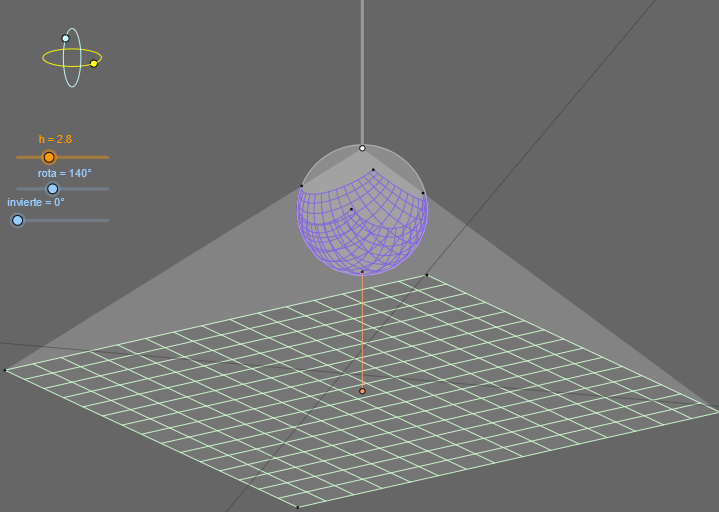
This example visualizes how Möbius (fractional linear) transformations acting on the complex plane map circles and related loci into new geometric figures, while making the correspondence of key points and angle behavior visually inspectable. It centers on concepts such as complex Möbius transformations, conformal geometry (circle/line mapping in the complex plane), angle relationships under transformation, and the construction of image curves/trajectories via mapped point sets. In the GeoGebra construction, OrthogonalLine, Circle, and Intersect are used to create reference lines, circles, and intersection points; Ellipse, Angle, Segment, and Point organize constrained geometric elements; CurveCartesian, Sequence, Ray, and Polygon are employed to draw transformed curves, ordered point sets, rays, and connecting polygons. Transformation steps are realized through mapping/inversion-style objects (e.g., invierte) and rotational components (e.g., rota), together with complex-number parameters/variables (zz0, zz1, ZZ1… and related intermediate objects) to obtain the image geometry (such as ellipse-related objects, point sets, and labeled points) for direct comparison. Suitable for advanced high school, undergraduate preparatory work, and early university study in complex analysis, transformation geometry, and computational visualization.
GeoGebra Commands & Parameters
OrthogonalLine(C, yAxis) → zz1Circle(C, 0.62) → zz0Intersect(zz0, zz1, 1) → ZZ1Intersect(zz0, zz1, 2) → ZZ2Ellipse(ZZ1, ZZ2, 0.65) → zElipse1Intersect(zElipse1, zz1) → ZZ5, ZZ6Point(zElipse1) → XYAngle(ZZ6, C, XY) → zAngRotOrthogonalLine(C, xAxis) → zz2Intersect(zz0, zz2, 2) → ZZ3Intersect(zz0, zz2, 1) → ZZ4Ellipse(ZZ3, ZZ4, 0.65) → zElipse2Intersect(zElipse2, zz2) → ZZ7, ZZ8Point(zElipse2) → ZAngle(ZZ8, C, Z) → zAngIncSegment(Q5, Q6) → p5Point(p5) → P5CurveCartesian(((r * u) * sin(zAngRot)), (r * (((-u) * cos(zAngRot)) * sin(zAngInc))), u, -10, 10) → ejexCurveCartesian(((r * v) * cos(zAngRot)), (((r * v) * sin(zAngRot)) * sin(zAngInc)), v, -10, 10) → ejeySegment(ZZ5, ZZ6) → zz4Segment(ZZ7, ZZ8) → zz3Intersect(zElipse2, zElipse1, 1) → zPunto1Intersect(zElipse2, zElipse1, 4) → zPunto2Segment(zPunto1, zPunto2) → zSeg2Segment(Base, PS) → h'Circle((PN + PS) / 2, r / 2) → cSequence(CurveCartesian[x(Base) + ((r * ((u / (u^(2) + v^(2) + 1) * cos(invierte)) + ((1 / 2 - 1 / (u^(2) + v^(2) + 1)) * sin(invierte)))) * sr) + ((r * v / (u^(2) + v^(2) + 1)) * cr), y(Base) - (((r * ((u / (u^(2) + v^(2) + 1) * cos(invierte)) + ((1 / 2 - 1 / (u^(2) + v^(2) + 1)) * sin(invierte)))) * cr) * sin(zAngInc)) + (((r * v / (u^(2) + v^(2) + 1)) * sr) * sin(zAngInc)) + (((((-r) * u / (u^(2) + v^(2) + 1)) * sin(invierte)) + ((r * (1 / 2 - 1 / (u^(2) + v^(2) + 1))) * cos(invierte)) + f) * cos(zAngInc)), v, -1, 1], u, -1, 1, paso) → esfera2Sequence(CurveCartesian[x(Base) + (((r * ((u / (u^(2) + v^(2) + 1) * cos(invierte)) + ((1 / 2 - 1 / (u^(2) + v^(2) + 1)) * sin(invierte)))) * g / (g - ((((-r) * u / (u^(2) + v^(2) + 1)) * sin(invierte)) + ((r * (1 / 2 - 1 / (u^(2) + v^(2) + 1))) * cos(invierte)) + f))) * sr) + (((r * v / (u^(2) + v^(2) + 1)) * g / (g - ((((-r) * u / (u^(2) + v^(2) + 1)) * sin(invierte)) + ((r * (1 / 2 - 1 / (u^(2) + v^(2) + 1))) * cos(invierte)) + f))) * cr), y(Base) - ((((r * ((u / (u^(2) + v^(2) + 1) * cos(invierte)) + ((1 / 2 - 1 / (u^(2) + v^(2) + 1)) * sin(invierte)))) * g / (g - ((((-r) * u / (u^(2) + v^(2) + 1)) * sin(invierte)) + ((r * (1 / 2 - 1 / (u^(2) + v^(2) + 1))) * cos(invierte)) + f))) * cr) * sin(zAngInc)) + ((((r * v / (u^(2) + v^(2) + 1)) * g / (g - ((((-r) * u / (u^(2) + v^(2) + 1)) * sin(invierte)) + ((r * (1 / 2 - 1 / (u^(2) + v^(2) + 1))) * cos(invierte)) + f))) * sr) * sin(zAngInc)), u, -1, 1], v, -1, 1, paso) → plano1Sequence(CurveCartesian[x(Base) + (((r * ((u / (u^(2) + v^(2) + 1) * cos(invierte)) + ((1 / 2 - 1 / (u^(2) + v^(2) + 1)) * sin(invierte)))) * g / (g - ((((-r) * u / (u^(2) + v^(2) + 1)) * sin(invierte)) + ((r * (1 / 2 - 1 / (u^(2) + v^(2) + 1))) * cos(invierte)) + f))) * sr) + (((r * v / (u^(2) + v^(2) + 1)) * g / (g - ((((-r) * u / (u^(2) + v^(2) + 1)) * sin(invierte)) + ((r * (1 / 2 - 1 / (u^(2) + v^(2) + 1))) * cos(invierte)) + f))) * cr), y(Base) - ((((r * ((u / (u^(2) + v^(2) + 1) * cos(invierte)) + ((1 / 2 - 1 / (u^(2) + v^(2) + 1)) * sin(invierte)))) * g / (g - ((((-r) * u / (u^(2) + v^(2) + 1)) * sin(invierte)) + ((r * (1 / 2 - 1 / (u^(2) + v^(2) + 1))) * cos(invierte)) + f))) * cr) * sin(zAngInc)) + ((((r * v / (u^(2) + v^(2) + 1)) * g / (g - ((((-r) * u / (u^(2) + v^(2) + 1)) * sin(invierte)) + ((r * (1 / 2 - 1 / (u^(2) + v^(2) + 1))) * cos(invierte)) + f))) * sr) * sin(zAngInc)), v, -1, 1], u, -1, 1, paso) → plano2Sequence(CurveCartesian[x(Base) + ((r * ((u / (u^(2) + v^(2) + 1) * cos(invierte)) + ((1 / 2 - 1 / (u^(2) + v^(2) + 1)) * sin(invierte)))) * sr) + ((r * v / (u^(2) + v^(2) + 1)) * cr), y(Base) - (((r * ((u / (u^(2) + v^(2) + 1) * cos(invierte)) + ((1 / 2 - 1 / (u^(2) + v^(2) + 1)) * sin(invierte)))) * cr) * sin(zAngInc)) + (((r * v / (u^(2) + v^(2) + 1)) * sr) * sin(zAngInc)) + (((((-r) * u / (u^(2) + v^(2) + 1)) * sin(invierte)) + ((r * (1 / 2 - 1 / (u^(2) + v^(2) + 1))) * cos(invierte)) + f) * cos(zAngInc)), u, -1, 1], v, -1, 1, paso) → esfera1Ray(PN, PN + (0, 1)) → aPolygon(P3, P2, PN) → poly1, poly1b, poly1c, poly1aPolygon(P3, P4, PN) → poly2, poly2b, poly2a, poly2cAngle(P2, P3, PN) → αAngle(P3, P4, PN) → βPolygon(P4, PN, P1) → poly3, poly3c, poly3a, poly3bAngle(P4, P1, PN) → γPolygon(P1, P2, PN) → poly4, poly4b, poly4a, poly4cAngle(P1, P2, PN) → δOrthogonalLine(B, xAxis) → bOrthogonalLine(B, b) → d
AI Drawing Prompt Reference
Draw a Möbius transformation of circles and angle correspondences. Start by drawing a horizontal line and a vertical line, then draw a circle with a center point. Find the intersection points of the circle and the vertical line, construct an ellipse, and find its intersections with the vertical line. Use rotation and angle measurement to show the angle relationships after transformation, and draw a series of curves and polygons to represent the transformed geometric figures.
The prompt above was compiled from the original drawing commands and is for reference only.