
Complex Addition and Multiplication Demo
Loading the math board and drawing, please wait…
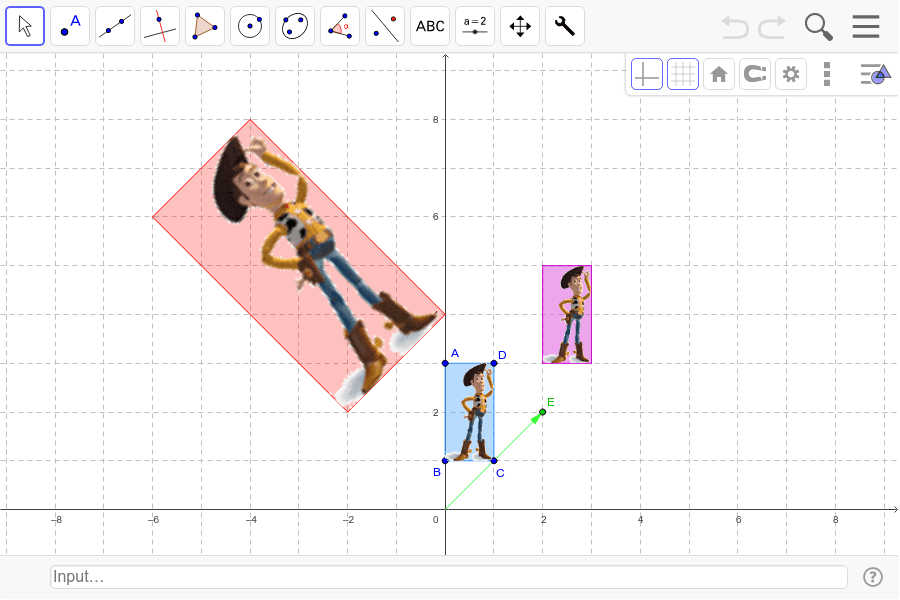
This example demonstrates complex number addition and multiplication through dynamic geometry. It involves core concepts like complex numbers, vectors, unit circle, addition, and multiplication. Constructed using commands like Polygon, Vector, Multiply, Add, it is suitable for high school mathematics teaching or beginners in complex number studies.
GeoGebra Commands & Parameters
Polygon(A, B, C, D) → poly1, a, b, c, dVector(F, E) → uMultiply(E, D) → HMultiply(E, C) → IMultiply(E, A) → JPolygon(G, J, H, I) → poly2, g, j, h, iAdd(E, C) → LAdd(E, D) → MAdd(E, A) → NPolygon(K, N, M, L) → poly3, k, n, m, l
AI Drawing Prompt Reference
Draw a dynamic geometric diagram to demonstrate complex number addition and multiplication, including a quadrilateral representing the complex plane, two vectors representing complex numbers, a unit circle, and two new quadrilaterals obtained through vector addition and multiplication operations, showing the geometric meaning of complex numbers. Start by drawing the quadrilaterals and vectors representing complex numbers, then obtain new complex numbers through vector operations, draw the new quadrilaterals representing these complex numbers, and finally display the results of addition and multiplication.
The prompt above was compiled from the original drawing commands and is for reference only.