
Completing the Square Visualization
Loading the math board and drawing, please wait…
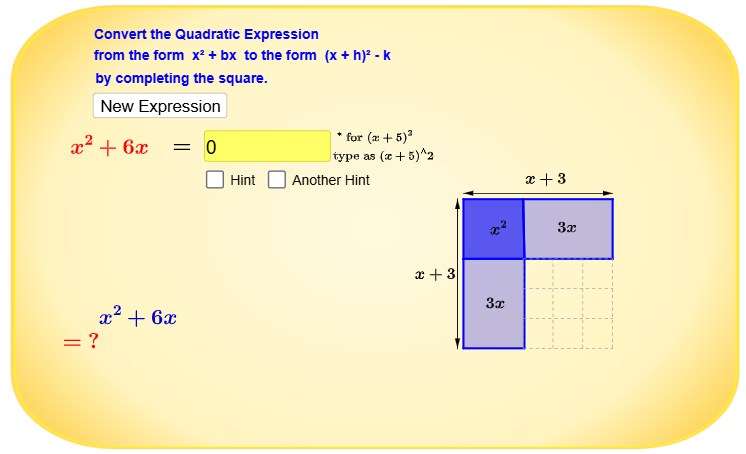
This example demonstrates the concept of 'completing the square' for quadratic expressions by visualizing the transformation of x^2 + bx into a perfect square form. It involves core math concepts like quadratic functions, geometric constructions, and algebraic manipulation. The construction utilizes GeoGebra commands such as RandomElement, Polygon, Intersect, Vector, Midpoint, Textfield, If, and Sequence to create dynamic visual aids. Suitable for high school mathematics education, it helps students grasp both the geometric intuition and algebraic process of completing the square.
GeoGebra Commands & Parameters
RandomElement({1, 2, 3, 4, 5, 6, 7}) → bPolygon(B, D, C, A) → poly1, b_1, d, c_2, aPolygon(I, F, E, D) → poly2, f, e, c_1, d_1Polygon(G, I, D, B) → poly3, g, i, d_2, b_2Intersect(a, c_2) → HIntersect(b_2, g) → H_2Polygon(H, O_2, P_2, N_2) → poly40, h, o_6, p_6, n_8Vector(U_2, V_2) → lVector(V_2, U_2) → a_4Vector(A_3, Z_2) → e_4Vector(Z_2, A_3) → a_5Midpoint(A_3, Z_2) → B_3Textfield(k11) → inputBox1If(b^(2) > c ∧ k11 ≟ k12, true, false) → inputcorrectSequence(Segment[(2, 0 + i), (2 + b, 0 + i)], i, 0, b, 1) → l1Sequence(Segment[(2 + i, 0), (2 + i, b)], i, 0, b, 1) → l2