
Completing the Square by David T
Loading the math board and drawing, please wait…
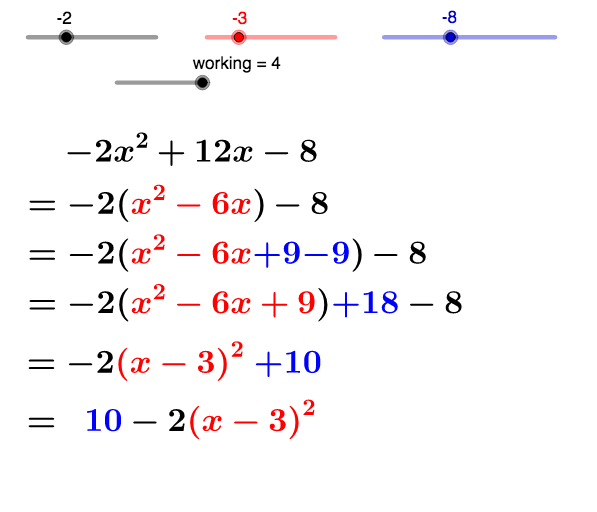
This example demonstrates how to convert a quadratic equation into its standard form using the method of completing the square. Key mathematical concepts include quadratic equations, the method of completing the square, and geometric shapes. GeoGebra commands used include If and objects. Suitable for middle and high school students to learn the solution of quadratic equations and the drawing of geometric shapes.
GeoGebra Commands & Parameters
If((a * b) > 0, "+", "-") → signabIf(c ≟ 0, "", If[c > 0, "+", "-"]) → signcIf(b > 0, "+", "-") → signbIf(((-a) * b^(2)) > 0, "+", "-") → signoutIf(((-a) * b^(2)) + c > 0, "+", "-") → signconstIf(((-a) * b^(2)) + c > 0, "", "-") → signconst_2If(c ≠ 0, "" + abs_c, "") → textabsc
AI Drawing Prompt Reference
Draw a quadratic equation graph by converting it into its standard form using the method of completing the square. First, input the coefficients a, b, and c, then determine the signs of the equation based on these coefficients. Next, draw the corresponding geometric shapes, including the parabola and its vertex, based on these signs.
The prompt above was compiled from the original drawing commands and is for reference only.