
Complementary Angles Meaning
Loading the math board and drawing, please wait…
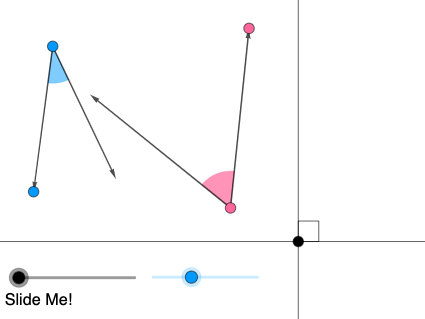
This example illustrates the concept of complementary angles, where the sum of two angles is 90 degrees. Key mathematical concepts include angle measurement and geometric construction. Using GeoGebra commands such as Rotate, OrthogonalLine, and Angle, the example dynamically demonstrates the rotation of angles and the construction of perpendicular lines. Suitable for middle school and above students studying geometry and trigonometry.
GeoGebra Commands & Parameters
Rotate(f, pi / 2 - α, E) → f'OrthogonalLine(E, f) → iAngle(i, f) → βRay(F, G) → nCircle(F, 2) → pIntersect(p, n, 1) → HRotate(H, α, F) → H'CircleSector(F, H, H') → qRay(F, H') → rRay(I, J) → sCircle(I, 2) → tIntersect(t, s, 1) → KRotate(K, pi / 2 - α, I) → K'Ray(I, K') → bCircleSector(I, K, K') → c_1Line(E, s) → gPoint(f) → APoint(g) → BAngle(A, E, B) → γDilate(I, If[0 < a ≤ 1, 1 - a, 0], E) → I'Vector(I, I') → uTranslate(c_1, u) → cRotate(c, If[0 < a ≤ 1, (a * ((2 * pi) - γ)), (2 * pi) - γ], I') → c'Point(r) → DRotate(M, pi / 2 - α, E) → M'Ray(E, M') → kPoint(r) → CAngle(C, F, L) → δDilate(F, If[1 < a ≤ 2, 2 - a, 0], E) → F'Vector(F, F') → vTranslate(q, v) → q'Rotate(q', If[1 < a ≤ 2, ((a - 1) * δ), δ], F') → q''Circle(F, G) → dCircle(I, J) → eIntersect(e, b, 1) → NIntersect(d, r) → O,Vector(F, G) → wVector(F, O) → jVector(I, J) → lVector(I, N) → mRotateText(text1, ((-pi)) / 4) → text2
AI Drawing Prompt Reference
Draw two complementary angles with a sum of 90 degrees. Start by rotating line segment f around point E to get f', then construct the perpendicular line i to f, and calculate the angle β between i and f. Next, draw a ray n from point F, and a circle p with center F and radius 2, intersecting ray n at point H, rotate H to get H', and draw a circular sector q. Then, draw a circle t with center I and radius 2, intersecting ray r at point K, rotate K to get K', and draw a circular sector c. Continue by rotating line segment s around point E to get line segment g, mark the endpoints of line segment f and g as A and B, and calculate angle γ. Next, scale point I around point E to get I', construct vector u, and translate circular sector c to get c'. Then, rotate line segment r around point E to get line segment k, mark the endpoints of line segment r as C and L, and calculate angle δ. Scale point F around point E to get F', construct vector v, translate circular sector q to get q', and rotate q' to get q''. Finally, draw circles d and e, intersecting circular sector q'' at point O, and intersecting circle d at point N, construct vectors w, j, l, and m, and rotate text1 to get text2.
The prompt above was compiled from the original drawing commands and is for reference only.