
Comparing Fractions by Anthony Dove
Loading the math board and drawing, please wait…
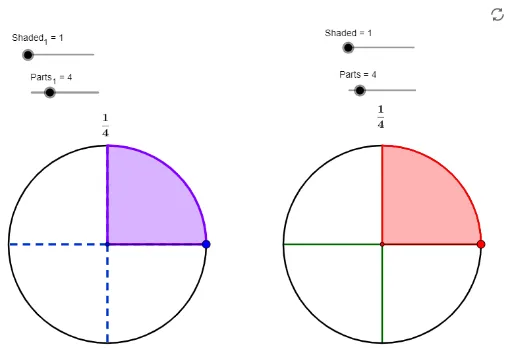
This example demonstrates how to use GeoGebra to compare the sizes of two fractions, involving core math concepts like fractions, geometric representation, and parametric equations. Key GeoGebra commands used include Circle, Point, Segment, Append, CircleSector, and Zip, making it suitable for middle school students and beyond for learning fraction comparison methods and mathematical demonstrations.
GeoGebra Commands & Parameters
Circle(A, Size) → cPoint(c) → BSegment(A, B) → aAppend(Sequence[Rotate[B, i, A], i, (360 / Parts_1)°, 359.9°, (360 / Parts_1)°], Rotate[B, 359.99°, A]) → ListPPoint(f) → CCircleSector(A, B, Element[ListP, Shaded_1]) → ShadeCircle(C, Size) → dPoint(d) → DAppend(Sequence[Rotate[D, s, C], s, (360 / Parts)°, 359.9°, (360 / Parts)°], Rotate[D, 359.99°, C]) → ListP2CircleSector(C, D, Element[ListP2, Shaded]) → Shade2Segment(C, D) → bZip(Segment[C, W], W, ListP2) → ListS2Zip(Segment[A, Z], Z, ListP) → ListS
AI Drawing Prompt Reference
Draw two circles with the same radius, one centered at A and the other at C. On the first circle, mark multiple points to form a shaded sector Shade. On the second circle, mark multiple points to form another shaded sector Shade2. Connect A to each point to form line segments ListS, and connect C to each point to form line segments ListS2.
The prompt above was compiled from the original drawing commands and is for reference only.