
Colored Voronoi Diagram: Partitioning the Plane by Seed Points
Loading the math board and drawing, please wait…
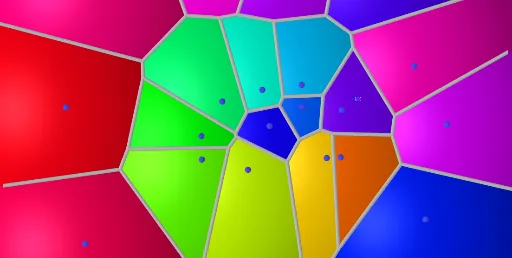
This example demonstrates a colored Voronoi diagram: given a finite set of seed points, the plane is partitioned into regions where each point in a region is closer (under the chosen distance measure) to its corresponding seed than to any other seed. The key math concepts are Voronoi tessellation, distance-based region boundaries, and the fact that Voronoi edges are loci of points equidistant to two (or more) seeds. Construction-wise, GeoGebra uses the Voronoi command to compute the partition, while Sequence and Element are used to organize the discrete set of sites and select/manage the resulting geometric objects. From the provided construct summary, objects such as T, S, R, Q, P, O, …, A (plus graphe1, l1, and collections like A1–A17) act as seeds/auxiliary parameters and display targets, enabling the colored visualization of different cells. Suitable for high school to early university use, for teaching computational geometry ideas, algorithmic visualization, and geometric construction practice.
GeoGebra Commands & Parameters
Voronoi(l1) → graphe1Sequence(Sphere[Element[l1, i] - (0, 0, r + 0.25), r], i, 1, Length[l1]) → l2Element(l2, A1) → B1Element(l2, A2) → B2Element(l2, A3) → B3Element(l2, A4) → B4Element(l2, A5) → B5Element(l2, A6) → B6Element(l2, A7) → B7Element(l2, A8) → B8Element(l2, A9) → B9Element(l2, A10) → B10Element(l2, A11) → B11Element(l2, A12) → B12Element(l2, A13) → B13Element(l2, A14) → B14Element(l2, A15) → B15Element(l2, A16) → B16Element(l2, A17) → B17Element(l2, A18) → B18Element(l2, A19) → B19Element(l2, A20) → B20
AI Drawing Prompt Reference
Create a colored Voronoi diagram on a plane with a set of seed points. Each seed defines a colored cell where every point is closer to that seed than to any other. Boundaries are perpendicular bisectors between neighboring seeds. Around each seed, draw concentric circles or spheres with varying radii, using distinct colors to highlight the distance-based partitioning. The final image shows a mosaic of polygonal regions overlaid with circular elements, illustrating geometric tessellation and spatial division.
The prompt above was compiled from the original drawing commands and is for reference only.