
Classifying a Triangle by its Angles
Loading the math board and drawing, please wait…
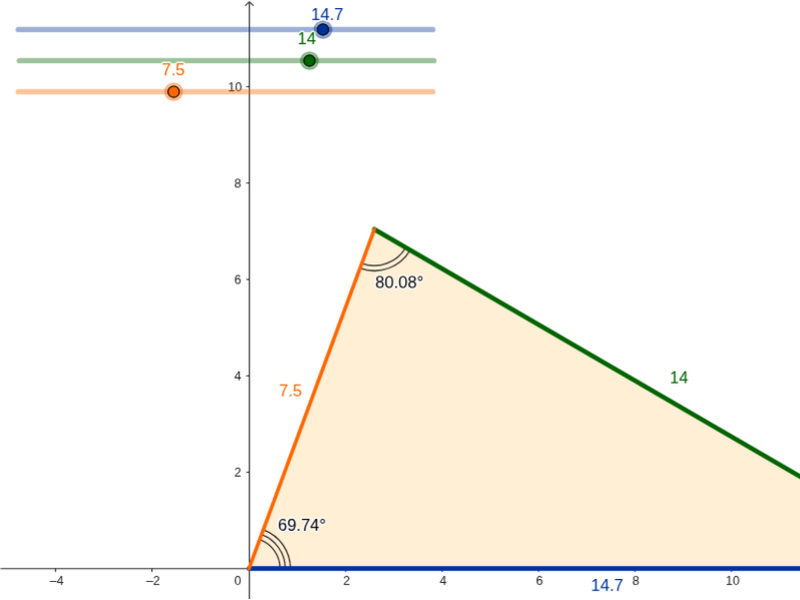
This example demonstrates classifying triangles as acute, right, or obtuse based on their side lengths. Key mathematical concepts include angle classification and triangle properties. It uses GeoGebra commands such as Circle, Intersect, Segment, Polygon, Textfield, and Angle. Suitable for middle school and above students to learn triangle classification and angle calculation.
GeoGebra Commands & Parameters
Circle(A, a) → dIntersect(d, e) → B, CCircle(C, b) → fSegment(A, C) → gCircle(A, c) → kIntersect(k, f) → F, G, ,Segment(C, F) → hSegment(F, A) → iPolygon(A, C, F) → poly1, f_1, a_1, c_1Textfield(a) → InputBox1Textfield(b) → InputBox2Textfield(c) → InputBox3Angle(A, F, C) → αAngle(F, C, A) → βAngle(C, A, F) → γ
AI Drawing Prompt Reference
Create a dynamic triangle-classification figure: start from one vertex and draw a circle whose radius is the first side length; intersect it with another existing curve to obtain two candidate points, and choose one as the second vertex. Connect these two vertices to form one side. Draw a second circle centered at the second vertex with the second side length, and a third circle centered at the first vertex with the third side length; their intersection gives the third vertex. Connect the third vertex to the first two to form a triangle, and display its three interior angles. Provide three editable input boxes controlling the three side lengths so the triangle can be observed as acute, right, or obtuse.
The prompt above was compiled from the original drawing commands and is for reference only.