
Circular and Kaleidoscopic Spline-Based Decorations
Loading the math board and drawing, please wait…
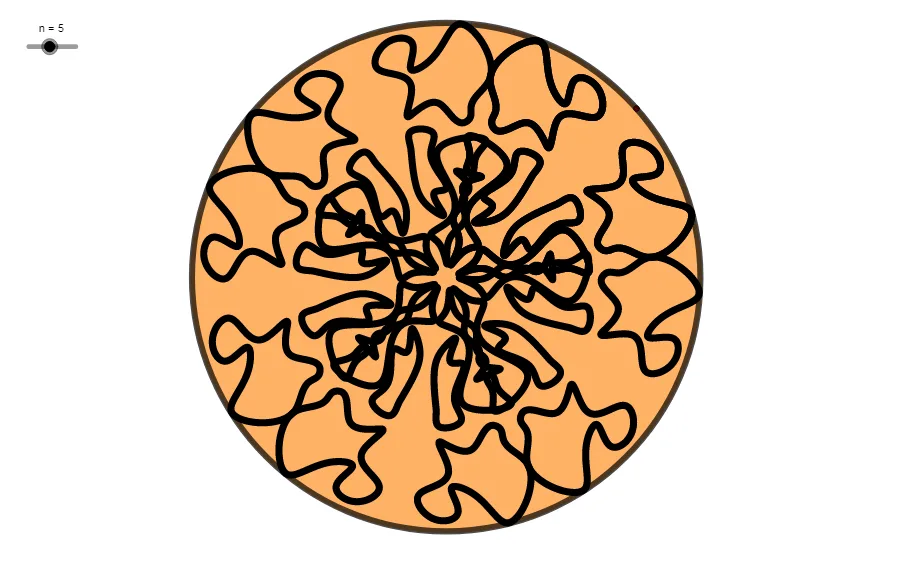
This example demonstrates circular and kaleidoscopic spline-based decorations. It involves key mathematical concepts such as circles, mirror transformations, and splines. Using GeoGebra commands like Point, Spline, Mirror, and Sequence, you can construct beautiful decorative patterns. Suitable for teaching geometric constructions and transformations.
GeoGebra Commands & Parameters
Point(xAxis) → PSpline(l1, 3) → aLine(P, O_1) → fMirror(a, f) → a'Spline(l2, 3) → bMirror(b, f) → b'Spline(l3, 3) → cMirror(c, f) → c'Sequence(Rotate[b, i, P], i, 0, (2 * π), (2 * π / n)) → l4Sequence(Rotate[b', i, P], i, 0, (2 * π), (2 * π / n)) → l5Sequence(Rotate[c, i, P], i, 0, (2 * π), (2 * π / n)) → l6Sequence(Rotate[c', i, P], i, 0, (2 * π), (2 * π / n)) → l7Sequence(Rotate[a, i, P], i, 0, (2 * π), (2 * π / n)) → l8Sequence(Rotate[a', i, P], i, 0, (2 * π), (2 * π / n)) → l9Circle(P, O_1) → dSegment(P, O_1) → gMirror(c, g) → c'_{1}Mirror(a, g) → a'_{1}Mirror(b, g) → b'_{1}Circle(P, O_1) → e
AI Drawing Prompt Reference
Draw a circle d with center P and radius PO1. Draw a segment g from P to O1. Mirror circles c, a, and b across g to get c'₁, a'₁, and b'₁. Rotate and mirror circles c, c', a, a', b, and b' around P with an angle of 2π/n to create arcs l4 to l9. These arcs form a symmetric decorative pattern around point P.
The prompt above was compiled from the original drawing commands and is for reference only.