
Circle–Mirror Construction in Geometry: Polygon and Segment Relations
Loading the math board and drawing, please wait…
In collections
Poorly Drawn Parallelograms 3
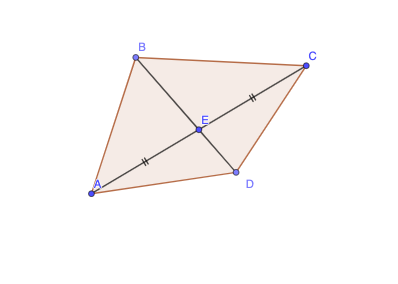
This example demonstrates how circle geometry combined with mirror (reflection) transformations can reveal consistent relationships between constructed points, segments, and polygonal structures. It centers on core concepts such as constructing circles, applying mirror symmetry to map geometric objects, and enforcing geometric constraints via lines, segments, and polygon vertices. In the GeoGebra build, it uses commands Circle (to create the circle), Mirror (to perform the reflection), Line (to draw lines), Point (to define key points), Polygon (to assemble a polygon), and Segment (to connect points). The construction involves the circle-related objects and multiple key points (e.g., E, C, c, A, C1, C', B, D) that drive the final geometric configuration. Suitable for classroom geometry (symmetry and construction practice) and for learners using dynamic geometry tools to visualize relationships in real-number geometric settings.
GeoGebra Commands & Parameters
Circle(E, C) → cMirror(C, E) → AMirror(C_{1}, E) → C'Line(C_{1}, C') → fPoint(f) → BPoint(f) → DPolygon(C, B, A, D) → q1, b, d, b', eSegment(A, E) → gSegment(E, C) → hSegment(B, E) → iSegment(E, D) → j
AI Drawing Prompt Reference
Draw a circle with one point as center and another as radius. Reflect one point on the circle over the center to get a new point. Reflect another point on the circle over a different point to get a second new point. Connect these two new points to form a line, and find two points on this line. Form a quadrilateral using the center, the two points on the line, and the two new points. Connect the center to the two new points and the center to the two points on the line to create four segments.
The prompt above was compiled from the original drawing commands and is for reference only.