
Choose the Translations
Loading the math board and drawing, please wait…
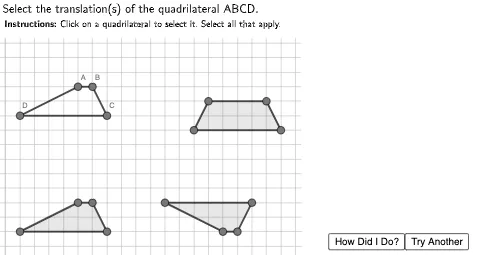
This example demonstrates how to choose translations. The core mathematical concept involved is translation. Using GeoGebra commands such as Polygon and Translation, you can construct translated objects. Suitable for middle school mathematics education.
GeoGebra Commands & Parameters
Polygon((-15, 7.4), (-15, 15), (25, 15), (25, 7.4)) → TopBox, f, g, h, iPolygon((10.4, 8), (25, 8), (25, -10), (10.5, -10)) → RightBox, j, k, l, mPolygon(A, B, C, D) → ABCD, a, b, c, dPolygon(A1, B1, C1, D1) → ABCD1, a1, b1, c1, d1Polygon(A2, B2, C2, D2) → ABCD2, a2, b2, c2, d2Polygon(A3, B3, C3, D3) → ABCD3, a3, b3, c3, d3
AI Drawing Prompt Reference
Draw a coordinate plane with a horizontal rectangle at the top and a vertical rectangle on the right side, adjacent but not overlapping. Then place four congruent quadrilaterals in the middle area, each shifted to a different position to show translation. Each quadrilateral has four vertices, same shape and orientation, only translated horizontally or vertically. Keep the grid visible for reference.
The prompt above was compiled from the original drawing commands and is for reference only.