
Chapter 23-1: Surface
Loading the math board and drawing, please wait…
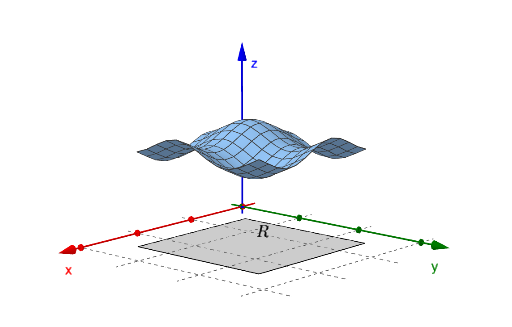
This example demonstrates the method of drawing surfaces. Core mathematical concepts include the definition and properties of surfaces. Using the Surface command and Polygon objects, complex surface shapes can be constructed. Suitable for high school and above students or teachers for teaching or self-study.
GeoGebra Commands & Parameters
Surface(x0, u, (t * f(x0, u)), u, x0, x1, t, 0, 1) → f1Surface(x1, u, (t * f(x1, u)), u, x0, x1, t, 0, 1) → f2Surface(u, y0, (t * f(u, y0)), u, y0, y1, t, 0, 1) → f3Surface(u, y1, (t * f(u, y1)), u, y0, y1, t, 0, 1) → f4Polygon(B, A, 4) → square, g, h, i, j, C, DSurface(u, v, f(u, v), u, x0, x1, v, y0, y1) → sPolygon(B, A, 4) → base, k, l, m, n, E, F
AI Drawing Prompt Reference
Create a 3D shape made from several connected parameter surfaces. First construct two surface patches by sweeping the given function with a shared parameter across two neighboring boundary lines over the same interval. Then construct two more surface patches by sweeping the function along the other parameter direction over the corresponding boundary curves, so the patches form a coherent surface block. Add a quadrilateral polygon as the bottom outline (the base), and place an additional full surface patch defined by the same function over the u–v parameter rectangle so it aligns with the base. Include another quadrilateral polygon outline for the base structure to emphasize the lower face.
The prompt above was compiled from the original drawing commands and is for reference only.