
Changing the Mirror Line: Reflections
Loading the math board and drawing, please wait…
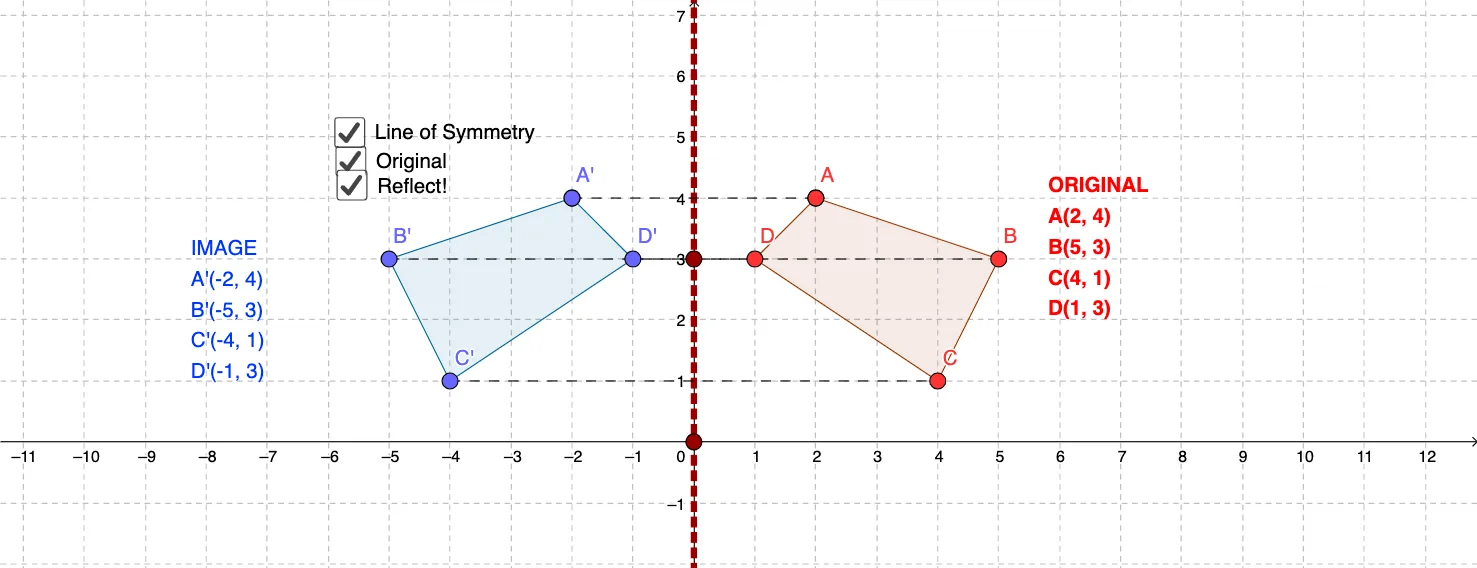
① This example shows how moving a mirror line reflects a polygon, displaying the original and its mirror image in real time. ② Core concepts include reflection transformations, congruence, polygon properties, and symmetry in coordinate geometry. ③ Construction highlights: Polygon creates the initial polygon; Line defines the mirror line; Mirror reflects points, segments, and the whole polygon; Segment assists in drawing edges. Objects include vertices A‑E, original polygon poly1, mirrored vertices A'‑E' and polygon poly1', plus auxiliary lines and texts. ④ Suitable for middle‑school geometry transformations, high‑school analytic geometry review, and introductory GeoGebra animation projects.
GeoGebra Commands & Parameters
Polygon(A, B, C, D, E) → poly1, a, b, c, d, eLine(F, G) → fMirror(A, f) → A'Mirror(B, f) → B'Mirror(C, f) → C'Mirror(D, f) → D'Mirror(E, f) → E'Polygon(A', B', C', D', E') → poly1', a', b', c', d', e'Segment(A', E) → jSegment(D', D) → kSegment(B', B) → lSegment(C', C) → m
AI Drawing Prompt Reference
On a coordinate plane, start with five points A, B, C, D, and E and connect them to form an original polygon as a reference. Define a mirror line as the straight line passing through two points F and G. Reflect each of A, B, C, D, and E across this line to obtain A', B', C', D', and E'. Connect the reflected points to form the mirrored polygon. Add a few connecting segments—such as between A' and E, D' and D, B' and B, and C' and C—to illustrate the point-to-point correspondence.
The prompt above was compiled from the original drawing commands and is for reference only.