
Centroid of Two Shapes
Loading the math board and drawing, please wait…
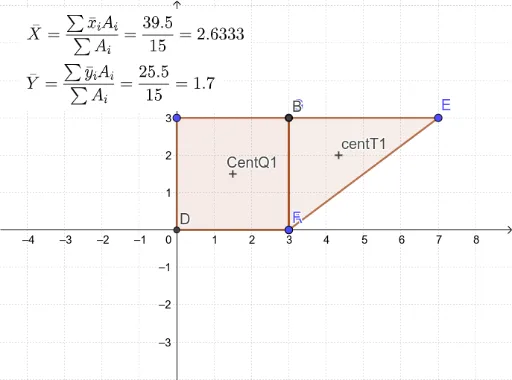
This example demonstrates how to find the centroid of two shapes using geometric construction methods. Key mathematical concepts include geometric transformations and the definition of the centroid. Using GeoGebra commands such as Polygon, Centroid, Intersect, etc., two shapes can be constructed and their centroid found. Suitable for high school mathematics education and learning.
GeoGebra Commands & Parameters
Polygon(E, F, G) → t1, g, e, fCentroid(t1) → centT1OrthogonalLine(A, xAxis) → nOrthogonalLine(A, yAxis) → pOrthogonalLine(C, yAxis) → qOrthogonalLine(C, xAxis) → rIntersect(n, q) → BIntersect(r, p) → DPolygon(A, B, C, D) → q1, a, b, c, dIntersectPath(q1, t1) → poly1, HDefined(poly1) → isP1Centroid(poly1) → CentP1If(isP1, (-poly1), t1) → a2If(isP1, x(CentP1), x(centT1)) → x2If(isP1, y(CentP1), y(centT1)) → y2
AI Drawing Prompt Reference
Draw a triangle and a rectangle that partially overlap. The triangle has three vertices, and the rectangle has four vertices, with two of its vertices lying on extensions of two sides of the triangle and the other two on extensions of the other two sides, so that the rectangle and triangle intersect to form a common region. Find and mark the centroids of both the triangle and the common region. The final figure should clearly show the triangle, rectangle, common region, and the two centroid points.
The prompt above was compiled from the original drawing commands and is for reference only.