
Calculating Area with Improper (Generalized) Integrals
Loading the math board and drawing, please wait…
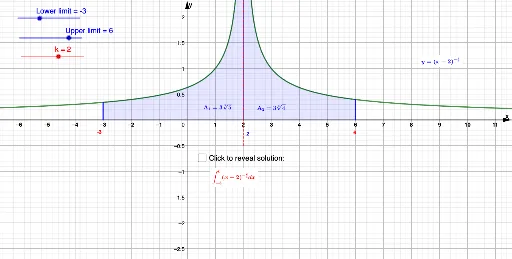
This GeoGebra example demonstrates how to compute the area enclosed by a curve using improper (generalized) integrals, highlighting that even when an integrand has problematic behavior near an endpoint, the area can still be obtained via a limiting process. The key ideas are integral geometry: area-under-the-curve interpretation, generalized integrals, and the relationship between integration bounds and the limiting value. Construction focuses on using Segment to create boundary lines for the region, Limit to define truncation parameters (e.g., L, U, or k) and take the limit as the cutoff grows or approaches a singular point, and Integral to accumulate the area over the varying interval. Additional objects (such as the function f and on-figure annotations like text1–text13) are used to label computed quantities (e.g., area labels) and provide visual intuition. Suitable for high school to early undergraduate calculus lessons on the geometric meaning of integrals and improper integral computation.
GeoGebra Commands & Parameters
Segment(A, B) → gLimit((3 * (U - 2)^(1 / 3)) - (3 * (x - 2)^(1 / 3)), k) → dSegment(D, F) → jSegment(E, G) → lIntegral(f, k + 1E-9, U) → cIntegral(f, L, k - 1E-10 - 0) → b
AI Drawing Prompt Reference
Draw a region enclosed by a curve and boundary lines, where the curve has a singularity near an endpoint. The area is computed using integrals and limits. Define boundary lines and label key points like start, end, and limit values to illustrate the relationship between integration and limits.
The prompt above was compiled from the original drawing commands and is for reference only.