
Calculating Area Under y=1/x
Loading the math board and drawing, please wait…
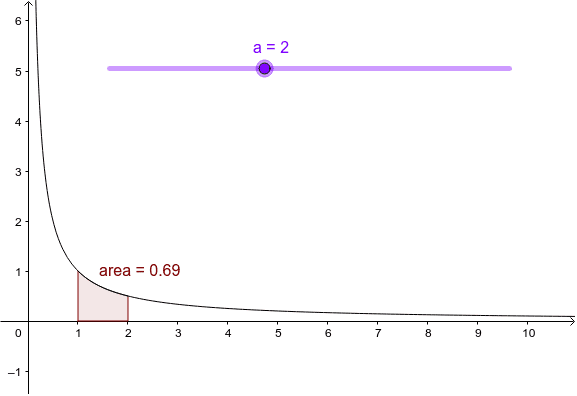
This example demonstrates how to use GeoGebra to calculate the definite integral of the function y=1/x over a specified interval [a, b], visually representing the geometric meaning of the integral as an area. Key mathematical concepts involved include definite integrals, improper integrals, logarithmic functions, and the fundamental theorem of calculus. The construction uses GeoGebra's Integral command to draw the integral region, with objects f (function), a (lower limit), and area (integral result) for dynamic demonstration. Suitable for high school and above students learning calculus, helping them understand the relationship between integral calculations and geometric shapes, as well as the effect of changing the upper limit on the area.
GeoGebra Commands & Parameters
Integral(f, 1, a) → area
AI Drawing Prompt Reference
Draw a coordinate plane with a hyperbola branch in the first quadrant representing the function y=1/x. Mark a fixed lower limit at x=1 and a movable upper limit on the x-axis. Shade the region between these two limits, bounded above by the curve and below by the x-axis. Include a dynamic numeric label that updates as the upper limit moves, showing the area value. Emphasize the curve, the shaded area, and the adjustable parameter relationship.
The prompt above was compiled from the original drawing commands and is for reference only.