
Open Middle: Definite Integral Problem
Loading the math board and drawing, please wait…
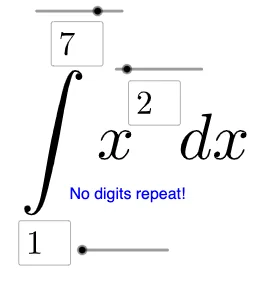
This example demonstrates how to construct a definite integral problem using GeoGebra, exploring the relationship between integration and the area of shapes. Core math concepts include definite integrals, derivatives, function graphs, limits, and geometric figures. Construction highlights involve using commands like Textfield, Integral, Mode, If, and objects such as a, b, n, g, h, j, f, d, l1, l2 for parameterization and auxiliary drawing. Suitable for high school and above students to understand practical applications and methods of definite integration.
GeoGebra Commands & Parameters
Textfield(a) → gTextfield(b) → hTextfield(n) → jIntegral(f, a, b) → dMode(l1) → l2If(Length[l2] ≟ 0, "No digits repeat!", "Repeated digits exist.") → text2
AI Drawing Prompt Reference
Draw a coordinate plane with a smooth curve representing a function. Shade the area under the curve between a left boundary and a right boundary to illustrate a definite integral. Place three input boxes nearby for entering the lower limit, upper limit, and number of subdivisions. Based on the subdivision number, draw vertical dashed lines inside the interval to partition the shaded region into several narrow strips. Below the graph, include a line of text that indicates whether any digit repeats in the widths of these strips. The overall composition should clearly show the function, the integral area, the parameter inputs, and the textual feedback.
The prompt above was compiled from the original drawing commands and is for reference only.