
Calculate the Area of the Composite Shape
Loading the math board and drawing, please wait…
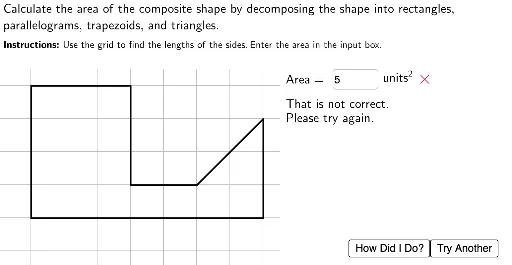
This example demonstrates how to calculate the area of a composite shape made up of multiple geometric figures. Key mathematical concepts include geometric construction, area calculation, and similar triangles. Using GeoGebra commands such as Point, Polygon, and Intersect, complex geometric shapes can be constructed. Suitable for middle school and above students or teachers.
GeoGebra Commands & Parameters
Point(yAxis) → Z_1Point(yAxis) → W_1Polygon(W_1, Z_1, A_2, B_2, C_2, D_2, E_2, F_2) → poly7, w_1, z_2, a_2, b_2, c_2, d_2, e_2, f_2Point(yAxis) → Q_1Polygon(Q_1, R_1, S_1, T_1, U_1, V_1) → poly6, q_1, r_1, s_1, t_1, u_1, v_1Point(yAxis) → H_1Point(yAxis) → G_1Polygon(G_1, H_1, I_1, J_1, K_1, L_1, O_1, P_1) → poly5, g_1, h_1, i_1, j_1, k_1, l_1, m_1, n_1Point(xAxis) → D_1Polygon(V, W, Z, A_1, B_1, C_1, D_1, E_1, F_1) → poly4, v, w, z_1, a_1, b_1, c_1, d_1, e_1, f_1Intersect(xAxis, yAxis) → SPoint(yAxis) → NPolygon(N, O, P, Q, R, S, T, U) → poly3, n, o, p, q, r, s, t, uPoint(yAxis) → HPolygon(H, I, J, K, L, M) → poly2, h, i, j, k, l, mPoint(yAxis) → BPoint(yAxis) → APolygon(A, B, C, D, E, F, G) → poly1, a, b, c, d, e, f, gLaTeX("Calculate\ the\ area\ of\ the\ composite\ shape\ by\ decomposing\ the\ shape\ into\ rectangles,\\ parallelograms,\, trapezoids,\, and\ triangles.") → Instructions1LaTeX("\textbf{Instructions\text{:}}\ Use\ the\ grid\ to\ find\ the\ lengths\ of\ the\ sides.\, Enter\ the\ area\ in\ the\ input\ box.") → Instructions2Textfield(StudentAns) → InputBox1LaTeX("Area=") → AreaLabelIf(ShapeIndex ≟ 1, Area[poly1], If[ShapeIndex ≟ 2, Area[poly2], If[ShapeIndex ≟ 3, Area[poly3], If[ShapeIndex ≟ 4, Area[poly4], If[ShapeIndex ≟ 5, Area[poly5], If[ShapeIndex ≟ 6, Area[poly6], Area[poly7]]]]]]) → ShapeAreaLaTeX("\checkmark") → RightCheckLaTeX("\times") → WrongCheckIf(StudentAnsNum < ShapeArea, LaTeX["small"], LaTeX["large"]) → problemLaTeX("Please\ type\ a\ number\ into\\ the\ input\ box\ before\\ checking\ your\ answer.") → NotStartedFBIntersect(t, u) → G_2Intersect(o, p) → H_2Segment(G_2, H_2) → S3L1Intersect(s, t) → I_2Segment(I_2, J_2) → S3L2Intersect(m_1, n_1) → K_2Point(h_1) → L_2Segment(K_2, L_2) → S5L2Intersect(k_1, l_1) → M_2Point(h_1) → N_2Segment(M_2, N_2) → S5L1Point(e_2) → O_2Intersect(b_2, c_2) → P_2Segment(O_2, P_2) → S7L1Segment(K_2, L_2) → S7L2Intersect(h, i) → Q_2Intersect(k, l) → R_2Segment(Q_2, R_2) → S2L1Intersect(a_1, b_1) → S_2Segment(P_2, S_2) → S4L1Intersect(d_1, e_1) → T_2Segment(T_2, R_2) → S4L2Intersect(u_1, v_1) → U_2Segment(Q_2, U_2) → S6L1Point(a) → V_2Segment(V_2, R_2) → S1L2Intersect(d, e) → W_2Segment(W_2, Z_2) → S1L1LaTeX("That\ is\ not\ correct.\\Please\ try\ again.") → KeepGoingFBLaTeX("One\ possible\ decomposition\ has\\ been\ shown.\, Find\ the\ area\ of\ each \\ of\ the\ simple\ shapes\ and\ add\\ them\ together\ to\ find\ the\ area\ of\\ the\ composite\ shape.") → AnswerShownFBPolygon((-2, 5.5), (20, 5.5), (20, 100), (-2, 100)) → White1, p_1, g_2, h_2, i_2Polygon((7.5, 6), (20, 6), (20, -100), (7.5, -100)) → White2, j_2, k_2, l_2, m_2LaTeX("units^2") → Units
AI Drawing Prompt Reference
Draw a composite shape consisting of a hexagon, pentagon, heptagon, quadrilateral, triangle, and parallelogram. Start by creating points on the y-axis, then draw polygons sequentially, and finally use intersections and segments to connect the vertices of these polygons, forming a complex geometric shape.
The prompt above was compiled from the original drawing commands and is for reference only.